Chrome profiles and Firefox containers both let you be signed in to two accounts on the same site at once, and both are free. They separate different amounts. A Chrome profile is a whole separate set of Chrome data: its own bookmarks, history, passwords, settings and cookies. A Firefox container separates cookies and site storage inside one Firefox, tab by tab, while everything else stays shared. Neither changes the device values a website can read, and neither gives each identity its own IP address without extra setup. That last part is what an antidetect browser adds: each profile gets its own storage, its own device fingerprint and its own proxy.
If you only need to keep a work and a personal login apart, the free options are usually enough. If the accounts must not look like they come from the same computer, they aren't.
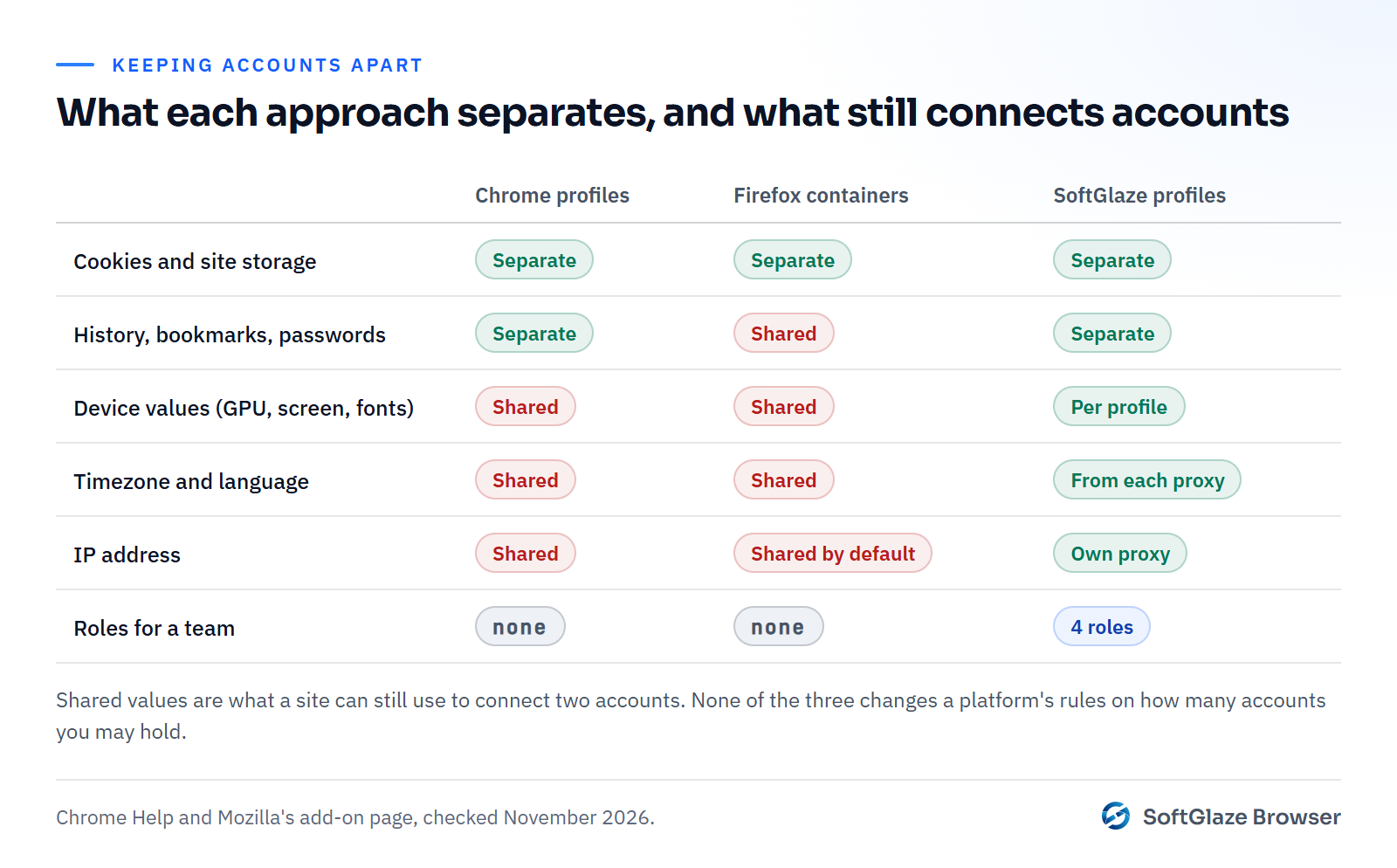
What each one separates
| Chrome profiles | Firefox Multi-Account Containers | SoftGlaze Browser profiles | |
|---|---|---|---|
| Cookies and site storage | Separate per profile | Separate per container | Separate per profile |
| History, bookmarks, saved passwords | Separate per profile | Shared across containers | Separate per profile |
| Extensions | Per profile | Shared across containers | Team extensions managed in the app |
| Device values a site reads (GPU, screen, CPU cores, fonts) | Same in every profile | Same in every container | Generated per profile |
| Timezone and language | Same in every profile | Same in every container | Per profile, from the proxy by default |
| IP address | Same for all, unless you add a proxy extension | Same for all by default | Own proxy per profile |
| Several people with different permissions | No | No | Owner, Admin, Manager and Operator roles |
| Price | Free | Free | 7-day trial, then from $5 a month |
Chrome profiles
Google describes profiles as a way to "keep all your Chrome info separate, like bookmarks, history, passwords, and other settings" (Chrome Help). Each profile opens in its own window and keeps its own cookies, so you can stay signed in to different Google accounts, or two accounts on any other site, side by side.
Good for: separating work and personal browsing, or two or three of your own accounts on a site that doesn't mind them being linked.
Limits: every profile runs on the same Chrome on the same computer, so a site sees the same GPU, screen, fonts, timezone and IP address in each. Google is also clear that profiles are not a security boundary between people: anyone using the computer can switch to another profile.
Firefox Multi-Account Containers
Containers are an official Mozilla add-on that "separates website storage into tab-specific Containers", so "Cookies downloaded by one Container are not available to other Containers" (Multi-Account Containers on Firefox Add-ons). You colour-code tabs, and each colour is a separate set of cookies.
Good for: being signed in to several accounts on the same site in one window, quickly. Switching identity is opening a tab of another colour, with no extra window.
Limits: containers only split website storage. Your history, bookmarks and add-ons stay those of the one Firefox profile, and the device values and IP address a site sees are the same in every container.
An antidetect browser
An antidetect browser, sometimes called a multi-profile browser, treats each profile as a separate browser with three things of its own: storage, a device fingerprint and a network route. What is an antidetect browser explains how that works and what it can't promise.
In SoftGlaze Browser, each profile has its own data folder, its own generated device values, and its own proxy. When a proxied profile launches, its timezone, language and WebRTC address are set from where the proxy exits. You can see exactly what a profile will report before it launches, and test it with Leak Check.

It also adds what neither free option has: team roles. You can share a profile with a colleague to use without showing them the account password or the proxy login, and see who launched what in the activity log. See team access.
Limits: it is a separate app with a learning curve, profiles use more memory than tabs, SoftGlaze runs on Windows 10 and 11 only, and it costs money after the trial. And like the free options, it doesn't change the rules of the sites you use: several profiles make several accounts possible, not permitted.
Which one do you need?
- Two of your own logins on one site, and you don't mind them being linked: Firefox containers.
- Separate work and personal browsing, each with its own bookmarks and passwords: Chrome profiles.
- Client accounts, or accounts that should not look like they share one computer: separate profiles with their own fingerprint and proxy. See browser profiles for agencies.
- A team using the same accounts: profiles you can share by role, so nobody has to send passwords around. How to share account access without sharing the password compares the options.
Practical costs of each
Memory. Each Chrome profile opens in its own window, and each open profile costs memory. Containers live as tabs in one Firefox window, so they are the lightest option. Each SoftGlaze profile launches as a separate browser too, so ten open profiles use roughly what ten separate browser windows would; plan your computer's memory around how many you run at once.
Where the data goes. Chrome profiles can sync to a Google account, and Firefox can sync to a Mozilla account, if you sign in to them. SoftGlaze keeps profiles, cookies and team members in a database on your own computer, and its cloud sync is off unless you point it at a server you run.
Setup time. A Chrome profile or a container takes seconds. A SoftGlaze profile takes a minute or two the first time, mostly choosing and testing its proxy. After that, spreadsheet import and Quick Generate create many profiles at once.
Moving existing sessions across
You don't always need to sign in again. SoftGlaze's profile editor can import cookies into a profile, and a running profile's cookie manager imports and exports them in JSON or Netscape format. Only move cookies for your own accounts, and treat an exported cookie file like a password: anyone who has it may be able to use the session.
Questions people ask
Do Chrome profiles stop websites from linking my accounts?
They stop cookies from being shared, which is the most obvious link. The device values and IP address are still the same in every profile, so a site that looks at those can still connect them.
Are Firefox containers more private than Chrome profiles?
They separate less, not more: only website storage. Their advantage is convenience, many identities in one window.
Can I give each Chrome profile its own proxy?
Not with Chrome's own settings, which use the computer's proxy configuration. Extensions can do it, but the device values stay the same.
Is an antidetect browser overkill for two accounts?
Often, yes. If the accounts are both yours and the site allows them, a Chrome profile or a container may be all you need.
Create a profile, give it a proxy and launch it in the demo, with sample data. No download.