MCP browser automation means letting an AI app operate a web browser through the Model Context Protocol. The MCP documentation describes the protocol as "an open-source standard for connecting AI applications to external systems". A browser MCP server is one of those external systems: it offers tools such as "open this page", "click this button", "type this text" and "read what's on the page", and an AI app like Claude, Cursor or VS Code calls them while it works on a task. The important choices are which browser the AI acts in, what it is allowed to change, and who approves it.
How a browser MCP server works
There are three parts:
- The AI app, the MCP client. It decides which tool to call next, based on your instructions and what the page shows.
- The MCP server, usually a program on your own computer. It lists its tools, receives the AI app's calls and carries them out. Local servers are reached over standard input and output, or over HTTP on your own machine.
- The browser, which the server controls, typically through the Chrome DevTools Protocol, the same interface Puppeteer and Playwright use.
Three kinds of browser an agent can drive
A fresh browser. The server launches a new browser, and the AI starts with no logins. It is clean and repeatable, which suits testing, but the agent has to sign in to anything it needs.
Your everyday browser. Some servers connect to the browser you already use, so the AI sees your real logins. Microsoft's Playwright MCP, for example, says it can run "with persistent profile like a regular browser (default), in isolated contexts for testing sessions, or connect to your existing browser using the browser extension". Convenient, but the AI is acting with every account you are signed in to.
Managed browser profiles. A multi-profile browser can let the AI act inside one specific profile, with that profile's own cookies, proxy and device values, and nothing else. The AI works in the account it was asked to work in, from the address that account normally uses. What is an antidetect browser explains how such profiles are kept apart.
Risks to plan for
- Instructions hidden in pages. Anything the AI reads on a web page goes into its context, and a page can contain text written to manipulate it. Treat page content as untrusted data, never as instructions.
- Side effects. Reading a page is harmless. Posting, buying, deleting or changing settings is not. You want a human decision before anything with consequences.
- Secrets. An agent doesn't need to see passwords, cookies or 2FA codes to do useful work, so the tools shouldn't hand them over.
- Runaway loops. An agent that misunderstands a task can repeat it many times. Rate limits and a single stop button matter.
- Platform rules. Many sites limit or forbid automated use. An AI driving a browser is still automation.
SoftGlaze AI in version 1.0.22
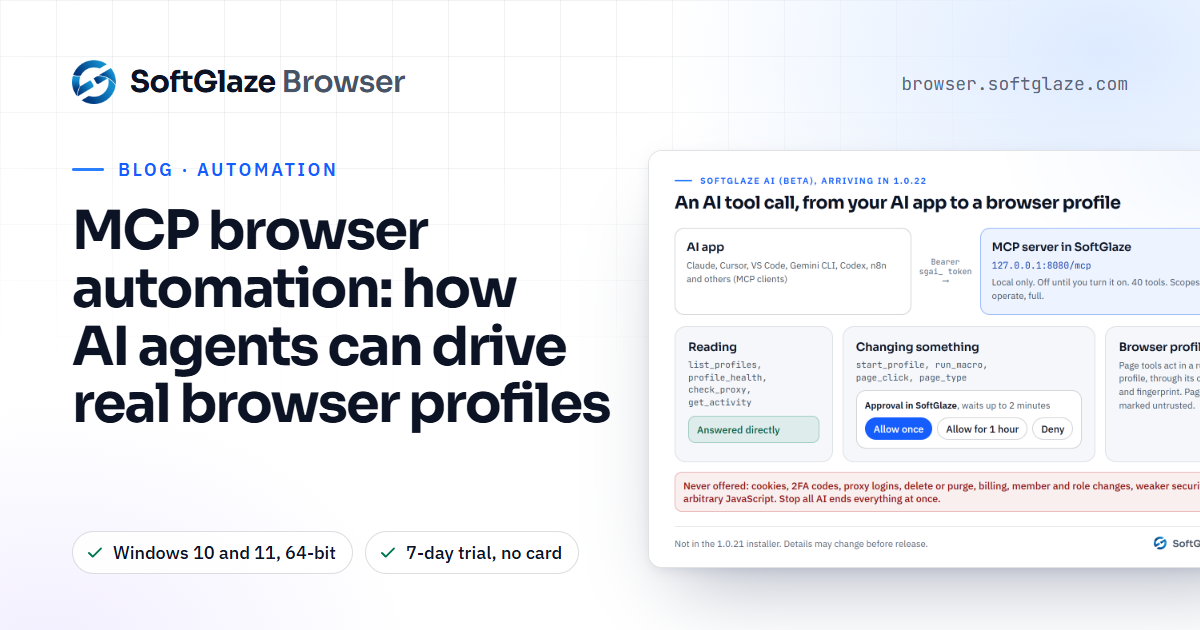
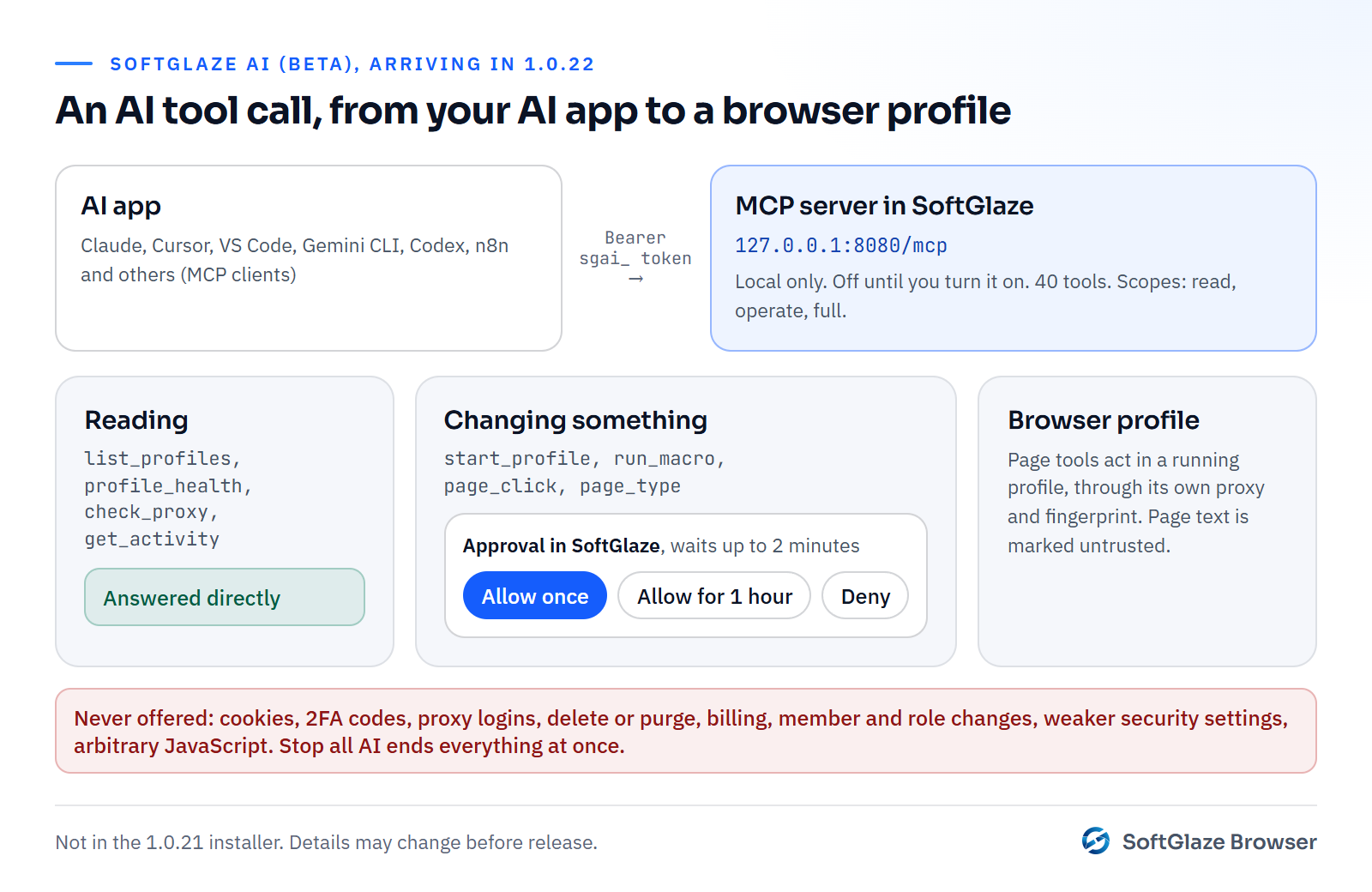
SoftGlaze AI is an MCP server built into SoftGlaze Browser. It ships as a Beta in version 1.0.22, which is on the download page; if you are on 1.0.21, install the new version over it. As a Beta, details may still change. Here is how it is built:
- Local and off by default. It runs inside the app at 127.0.0.1, port 8080 unless you change it, at the path /mcp, and answers only requests that carry a token you created. Tokens have a scope (read, operate or full) and expire after 7, 30 or 90 days.
- 40 tools. 31 work with the workspace, such as listing profiles, checking a proxy, starting a profile or running a macro, and 9 work inside a running profile's page: navigate, read, click, type, scroll, take a screenshot and so on.
- Changes wait for you. Anything that changes something opens a dialog in SoftGlaze naming the profiles it touches, with Allow once, Allow for 1 hour and Deny. A request waits up to two minutes for your answer.
- Real profiles. Page tools act inside a running Chromium profile, through that profile's proxy and fingerprint, and you can limit them to sites you list. Page text comes back marked as untrusted.
- Things it can never do. Export or read cookies, see 2FA codes, see proxy usernames or passwords, delete or purge anything, touch billing or licences, change members or roles, weaken security settings, or run arbitrary JavaScript in pages.
- One button stops everything. Stop all AI switches the server off, closes every AI session, denies pending approvals and stops runs it started.
It comes with setups for Claude Desktop, Claude Code, Cursor, VS Code with GitHub Copilot, Gemini CLI, ChatGPT desktop and Codex, Windsurf, Cline and n8n. The SoftGlaze AI page and the connection guide describe the Beta in full.
Scripting profiles without the AI: the local API
You don't need the MCP server to script profiles. The local API, off until you turn it on under Developer API Access in Settings, listens on 127.0.0.1, port 8080. With an API key (keys start with sg_, are shown once and are stored only as hashes) you can list profiles and start one; the start call returns a wsEndpoint you can attach Puppeteer or Playwright to, so your own script drives the profile with its proxy and fingerprint in place.
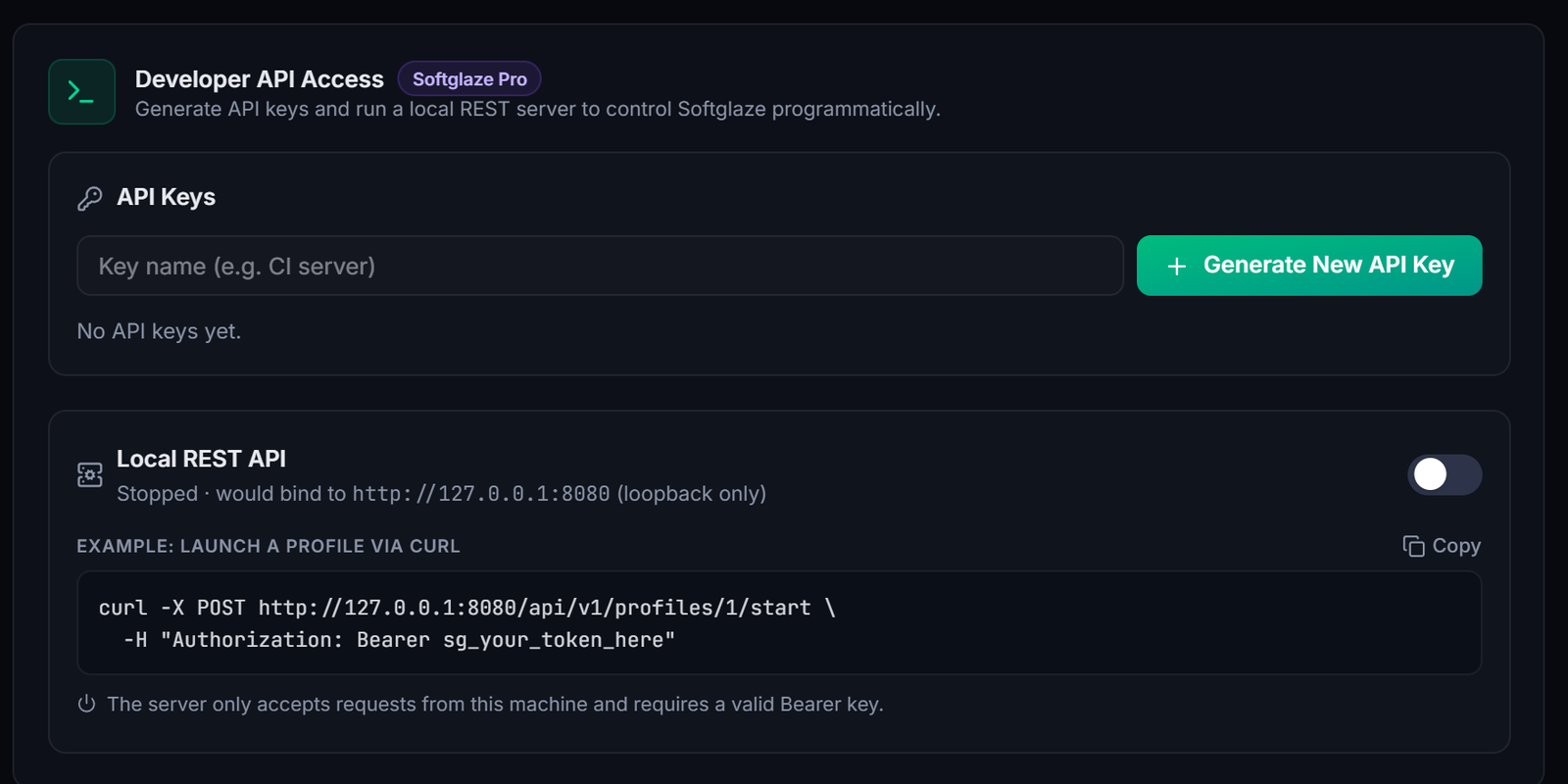
curl -X POST http://127.0.0.1:8080/api/v1/profiles/42/start -H "Authorization: Bearer sg_YOUR_KEY"One caution from the docs: a key acts as the workspace Owner, so anyone holding one can list, start and stop every profile in the workspace. Keep keys out of shared scripts.
For work you repeat by hand, the built-in macros need no code at all: record or build a flow from 13 step types and run it across up to 10 profiles at once on Enterprise and the trial, or 3 on Pro. The automation page covers macros, schedules and the local API.
Questions people ask
Can an AI agent see my passwords through SoftGlaze AI?
No. Cookies, 2FA codes and proxy logins are on the list of things its tools never return, and delete, billing and member changes are never offered.
Which AI apps can connect?
Any app that speaks MCP over Streamable HTTP, with ready-made setups for Claude Desktop, Claude Code, Cursor, VS Code, Gemini CLI, ChatGPT desktop and Codex, Windsurf, Cline and n8n.
Does it need the internet or a SoftGlaze account?
The server runs on your own computer at 127.0.0.1 and needs no SoftGlaze account. But whatever your AI app reads through it, such as profile names or page text, goes to that AI app's provider like anything else you give it, so connect only apps you trust with that data.
Which version do I need?
Version 1.0.22 or later. If you are on 1.0.21, download the new installer and run it; your profiles stay on your computer as they are.
How to turn it on, connect each AI app, approve requests and stop everything, written for the Beta in 1.0.22.