


A grade is about the connection
It measures whether the proxy answers, how fast, and whether its address is on three blocklists. It doesn’t predict how a particular website treats that address.
Proxy checker
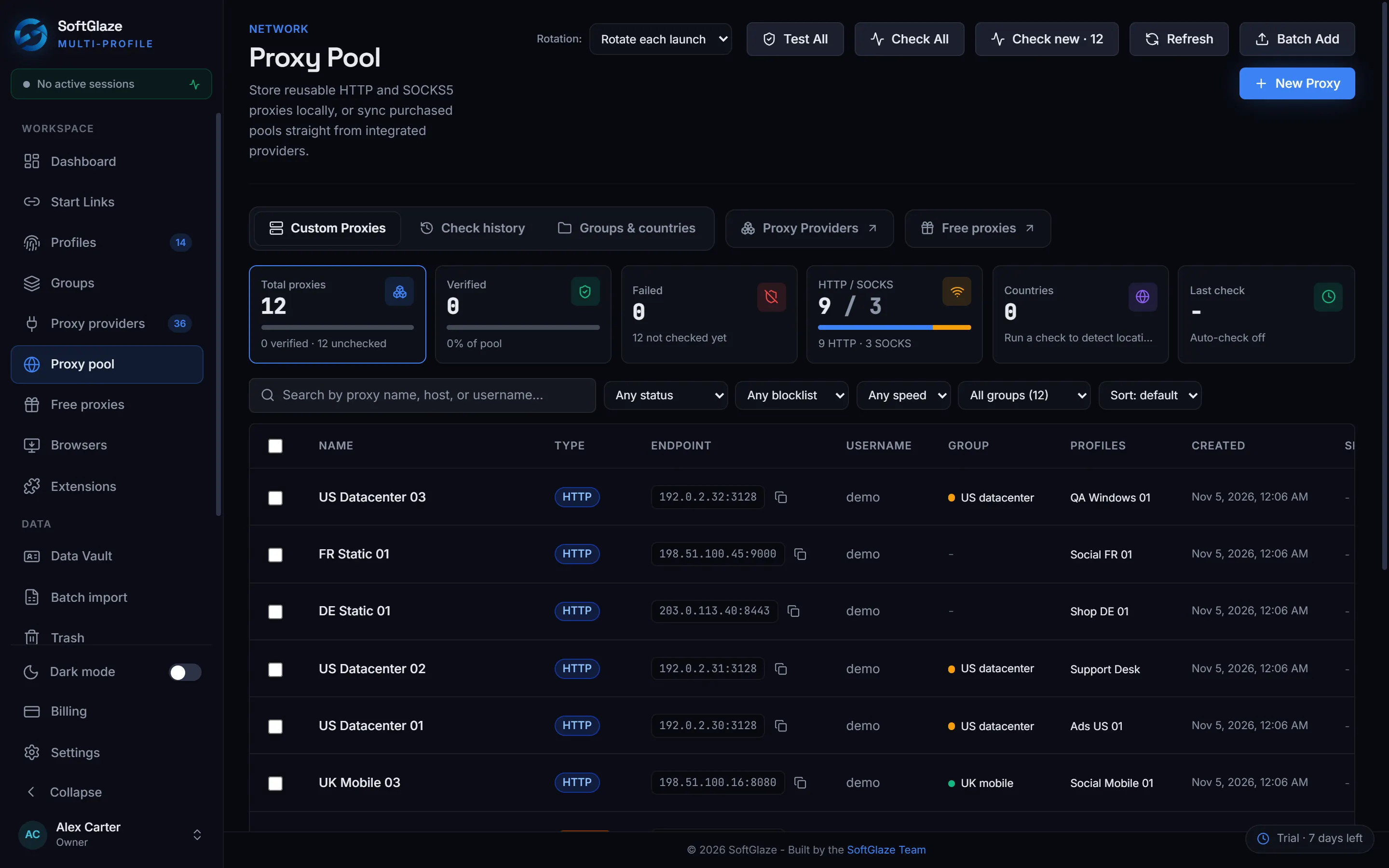
SoftGlaze Browser, a multi-profile (antidetect) browser for Windows, checks the proxies in your pool before your profiles depend on them. Each check sends three test requests through the proxy, records the exit IP, country and latency, looks the exit address up on three DNS blocklists and gives the proxy a health grade from A to F. Rotation then steers profiles away from proxies that failed.
Windows 10 and 11, 64-bit.7-day trial, no card needed.
A separate checker
You copy proxies into a website one batch at a time, read the results, then go back and edit profiles by hand. Nothing remembers which proxy failed yesterday.
The checker in the pool
Check one proxy, a selection or the whole pool, on demand or every few minutes. The grade sits next to the proxy the profiles use, the history builds up on its own, and Failover to healthy skips what failed.
01What a check does
A check first asks an IP and location service (ipinfo.io) through the proxy, which gives the exit IP, the country and the latency. If that works, it sends two more requests through the proxy, to Google and to Cloudflare. Use Check on one proxy, Check selected, Check All for the whole pool at once, or Check new for proxies never checked. Set Auto-check every N minutes and the pool re-tests itself.
IP / Geo     ipinfo.io                               exit IP, country, latency
Google       https://www.google.com/generate_204
Cloudflare https://www.cloudflare.com/cdn-cgi/trace02Blocklist check
The exit address is looked up on three DNS blocklists: Spamhaus (IPv4 and IPv6), SpamCop and Barracuda. A listing lowers the health grade and shows which list flagged the address. A residential range in Spamhaus PBL is shown as such and doesn’t lower the grade: it is normal for residential and mobile proxies. Filter the pool to only clean proxies, or only flagged ones.
03The health grade
The score starts as the share of the three test requests that passed. Slow answers take points off: 8 above 800 ms on average, 18 above 1.5 seconds, 30 above 3 seconds. Each blocklist that lists the address takes 12 points, at most 30. A proxy whose first request fails is graded F, Dead.
| Grade | Score | Label |
|---|---|---|
| A | 90 to 100 | Excellent |
| B | 80 to 89 | Good |
| C | 65 to 79 | Fair |
| D | 45 to 64 | Weak |
| F | below 45 | At risk (Dead when the proxy doesn’t answer) |
04Rotation that avoids failed proxies
Give a profile a rotation pool and pick one policy for the workspace. Failover to healthy skips proxies whose last check failed. Fastest picks among the quickest proxies, the 3 fastest by default. For proxies that come with a rotation link from your provider, Rotate IP asks for a new exit address without replacing the proxy.
| Policy | What a profile gets at launch |
|---|---|
| Rotate each launch | The next proxy in its rotation pool. This is the default. |
| Sticky (fixed proxy) | Its own fixed proxy; the rotation pool is ignored. |
| Failover to healthy | A proxy from its pool whose last check didn’t fail. |
| Fastest (latency) | One of the fastest proxies in its pool, 3 by default. |
05History
Each proxy keeps its check history, with latency over time, so a proxy that slowly gets worse is easy to spot. The pool also lists proxies that worked before and failed later. “Fast” in the filters means 2 seconds or less.
Add proxies
Paste them in Batch Add, or pull them from one of 46 providers you already pay for.
Check All
Read each proxy’s grade, country and blocklist result, and remove or replace the weak ones.
Keep it running
Set Auto-check every N minutes and choose Failover to healthy as the rotation policy.
Limits and caveats
It measures whether the proxy answers, how fast, and whether its address is on three blocklists. It doesn’t predict how a particular website treats that address.
Spamhaus, SpamCop and Barracuda are checked. Other reputation databases are not.
Each check sends real requests through the proxy, so it uses a little of a metered plan.
One business day, Monday to Friday for a first reply.
Yes. SoftGlaze Browser checks the proxies in its pool: exit IP, country, latency, three DNS blocklists (Spamhaus, SpamCop, Barracuda) and a health grade from A to F. Check one, a selection or all of them, or on a schedule.
A is 90 to 100 (Excellent), B 80 to 89 (Good), C 65 to 79 (Fair), D 45 to 64 (Weak) and F below 45 (At risk), or Dead when the proxy doesn’t answer. The score comes from the test requests that passed, minus points for slow answers and blocklist listings.
No. A residential range in Spamhaus PBL is shown as a residential range, not as a listing, and doesn’t lower the grade.
Yes. With the Failover to healthy policy, a profile gets a proxy from its rotation pool whose last check didn’t fail.
Read it in the source
Paste your proxies, press Check All and read the grades.
No card needed.Windows 10 and 11, 64-bit.