面向代理商

客戶帳號放在各自的設定檔中,員工使用你分配的角色,並記錄誰做了什麼

把每個客戶的帳號放在不同的設定檔中,擁有獨立的 Cookie、裝置和代理。為員工分配四種角色之一,並為每個人設定限額,將設定檔共用為僅使用或可編輯,在 Enterprise 上,當客戶問發生了什麼時還可以匯出活動記錄。整個工作區儲存在你安裝它的 Windows 電腦上。

Windows 10 和 11,64 位。先享 7 天完整 Pro(最多 3 名成員),之後是免費方案,無需信用卡,沒有時間限制。

LinkedIn客戶網站

每個平台對代理商訪問都有自己的規定。如果平台提供合作夥伴或商務訪問方式,請與 SoftGlaze 一起使用,其餘部分請檢視平台規則。

品牌名稱和標誌歸其所有者所有。SoftGlaze 與它們沒有關聯。

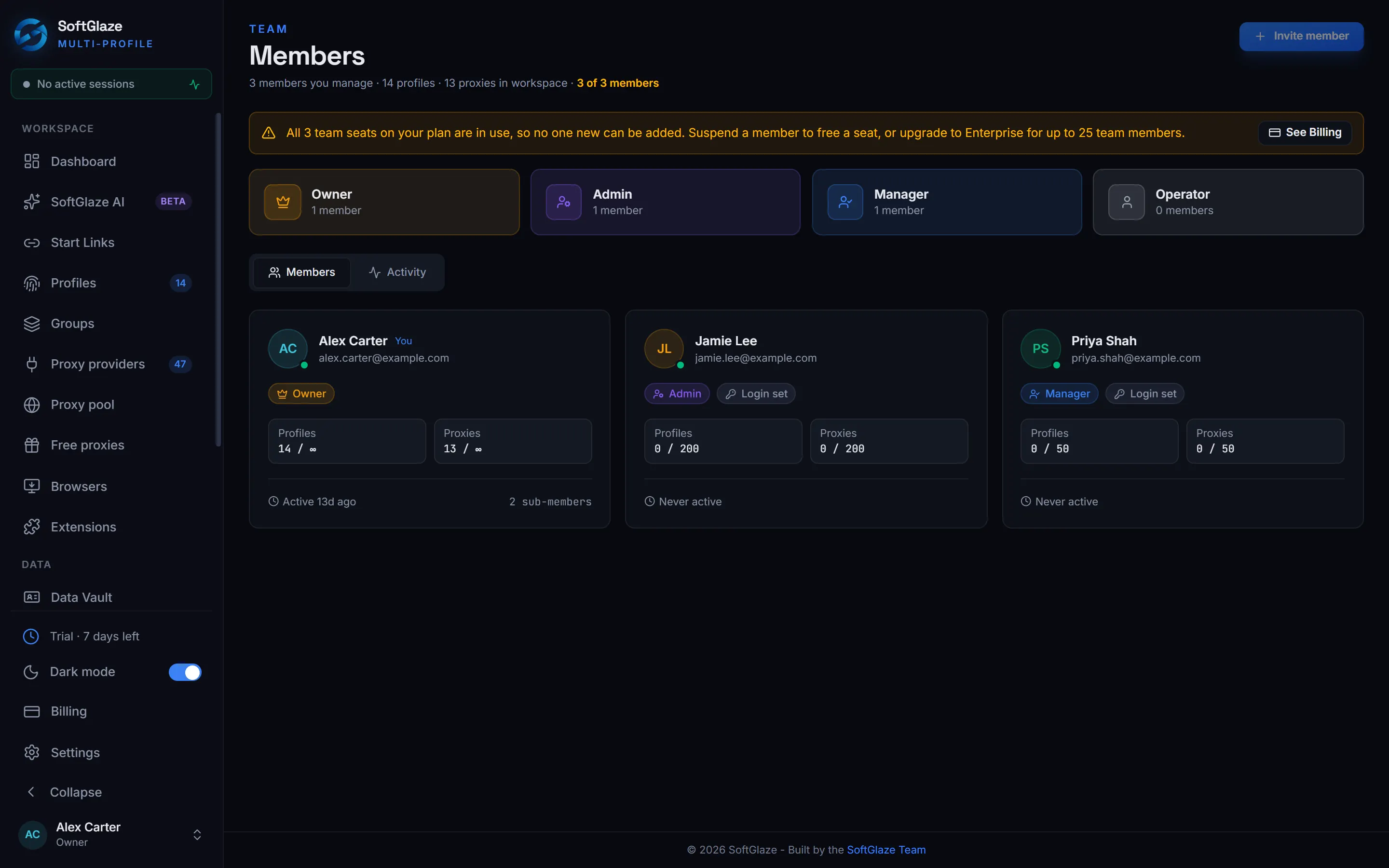
Members page: role counts for Owner, Admin, Manager and Operator, three demo members with their profile and proxy limits, and a notice that all 3 team seats are in use, with an upgrade to Enterprise for up to 25 team members.Members page: role counts for Owner, Admin, Manager and Operator, three demo members with their profile and proxy limits, and a notice that all 3 team seats are in use, with an upgrade to Enterprise for up to 25 team members.
Members: all 3 seats of the trial in use.

客戶帳號為什麼會被關聯

每個工位一個瀏覽器,只要有人切換帳號,客戶就會混在一起

當員工在同一個瀏覽器中切換不同客戶時,每個客戶的工作階段都會碰上下一個客戶的工作階段,而密碼最終會出現在聊天記錄裡,因為沒有別的方式交接。

一個共用瀏覽器和一張密碼錶

  • 工作階段重疊. 客戶 B 登入時,客戶 A 的 Cookie 還在瀏覽器裡。
  • 同一台裝置和同一個地址. 每個客戶的帳號看到的都是同一台電腦和同一個 IP。
  • 密碼四處傳遞. 交接訪問權限就意味著傳送登入資訊,而它會一直留在接收者那裡。
  • 沒有記錄. 沒有人能說清上週二誰在客戶帳號中改了什麼。

每個客戶帳號一個設定檔

  • 獨立的工作階段. 每個設定檔保留自己的 Cookie 和儲存空間。
  • 獨立的裝置和代理. 每個設定檔都有自己生成的指紋和自己的代理。
  • 共用訪問權限,而不是密碼. 將設定檔共用為僅使用或可編輯;對經理以下的角色,代理登入資訊、Cookie 匯出和雙重驗證碼顯示為 ••••••••。
  • 一份記錄. 啟動、編輯、匯入、刪除、成員變更和登入都會記錄下是誰、在什麼時間。

你會用到的功能

員工接觸客戶帳號之前,代理商需要的控制手段

訪問會被應用程式本身拒絕,而不僅僅是在螢幕上隱藏,並且覆蓋設定只能收回權限。

四種角色,各有限額

所有者、管理員、經理和操作員。預設情況下,管理員最多可持有 200 個設定檔、200 個代理和 10 個開啟的瀏覽器;經理為 50、50 和 5;操作員為 10、10 和 2。所有者沒有限制。你可以修改任何成員的限額,並從其側邊欄中隱藏頁面。
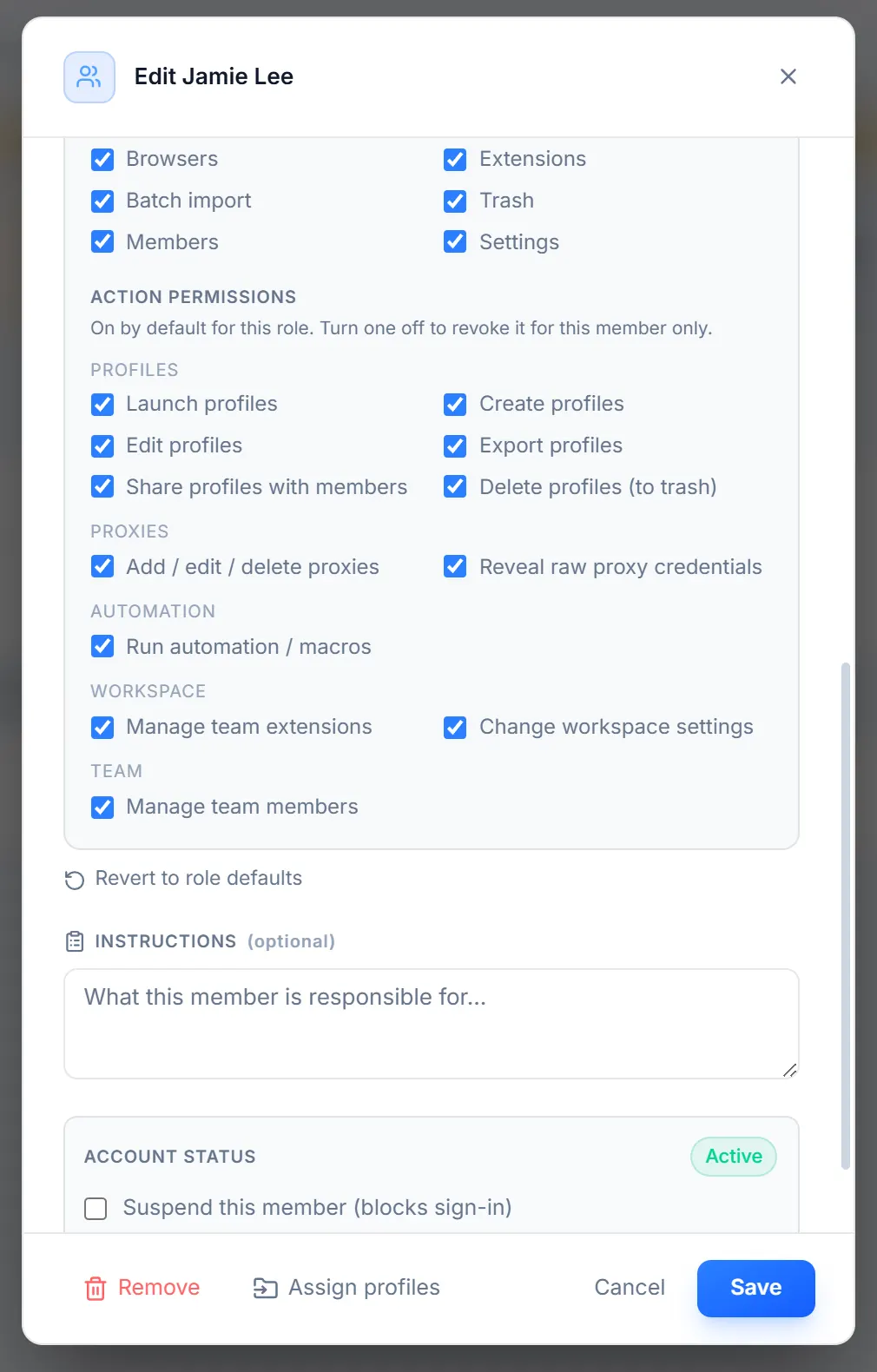
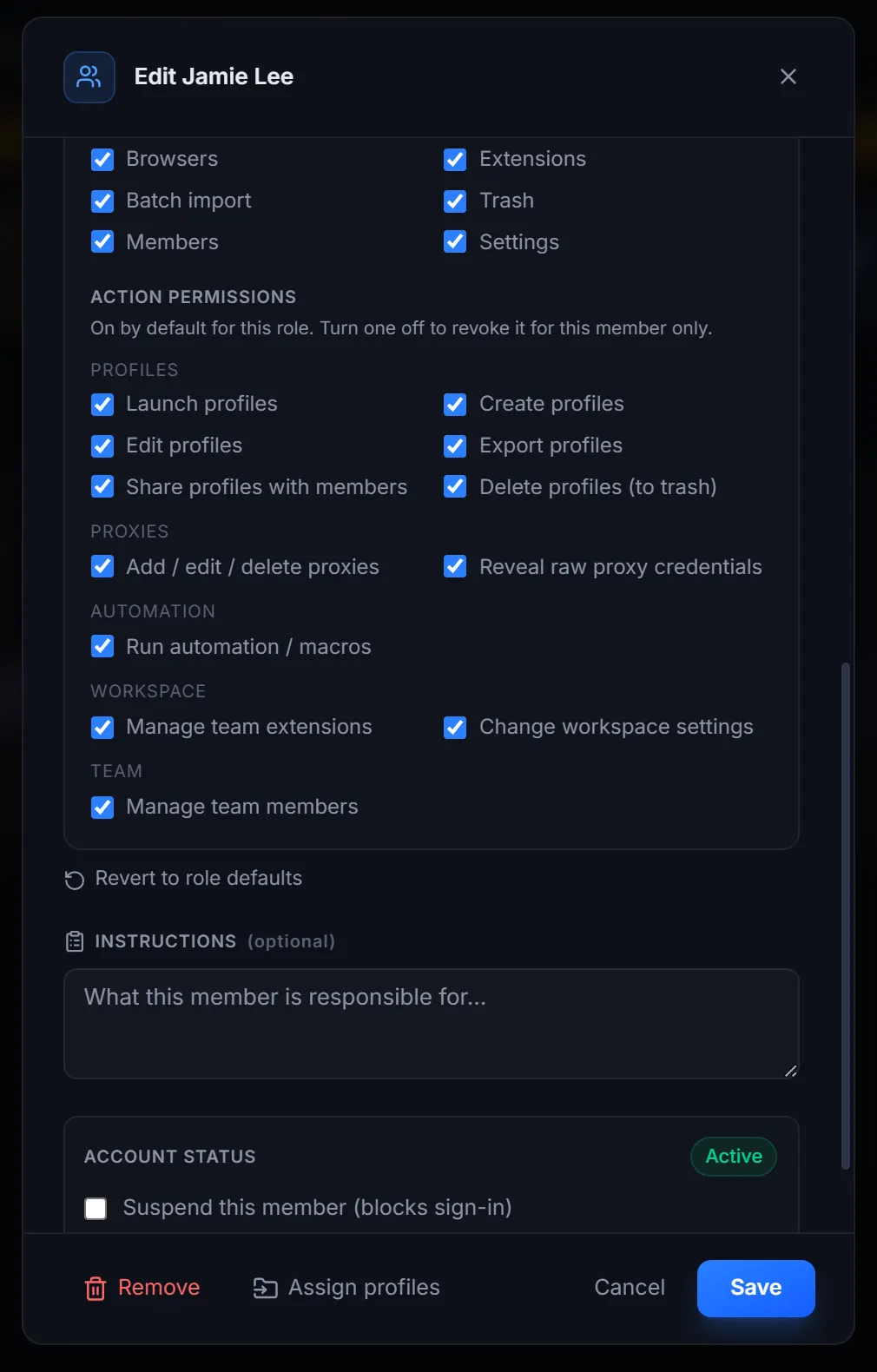
Edit member dialog for Jamie Lee: visible features, and action permissions such as launch, create, edit, export and share profiles with members, add or delete proxies, reveal raw proxy credentials, and run automation.Edit member dialog for Jamie Lee: visible features, and action permissions such as launch, create, edit, export and share profiles with members, add or delete proxies, reveal raw proxy credentials, and run automation.

可匯出的活動記錄

按成員、操作和日期範圍篩選,然後匯出為 CSV 或 JSON 交給客戶。匯出功能在 Enterprise 和試用期間可用;Pro 可以檢視記錄。
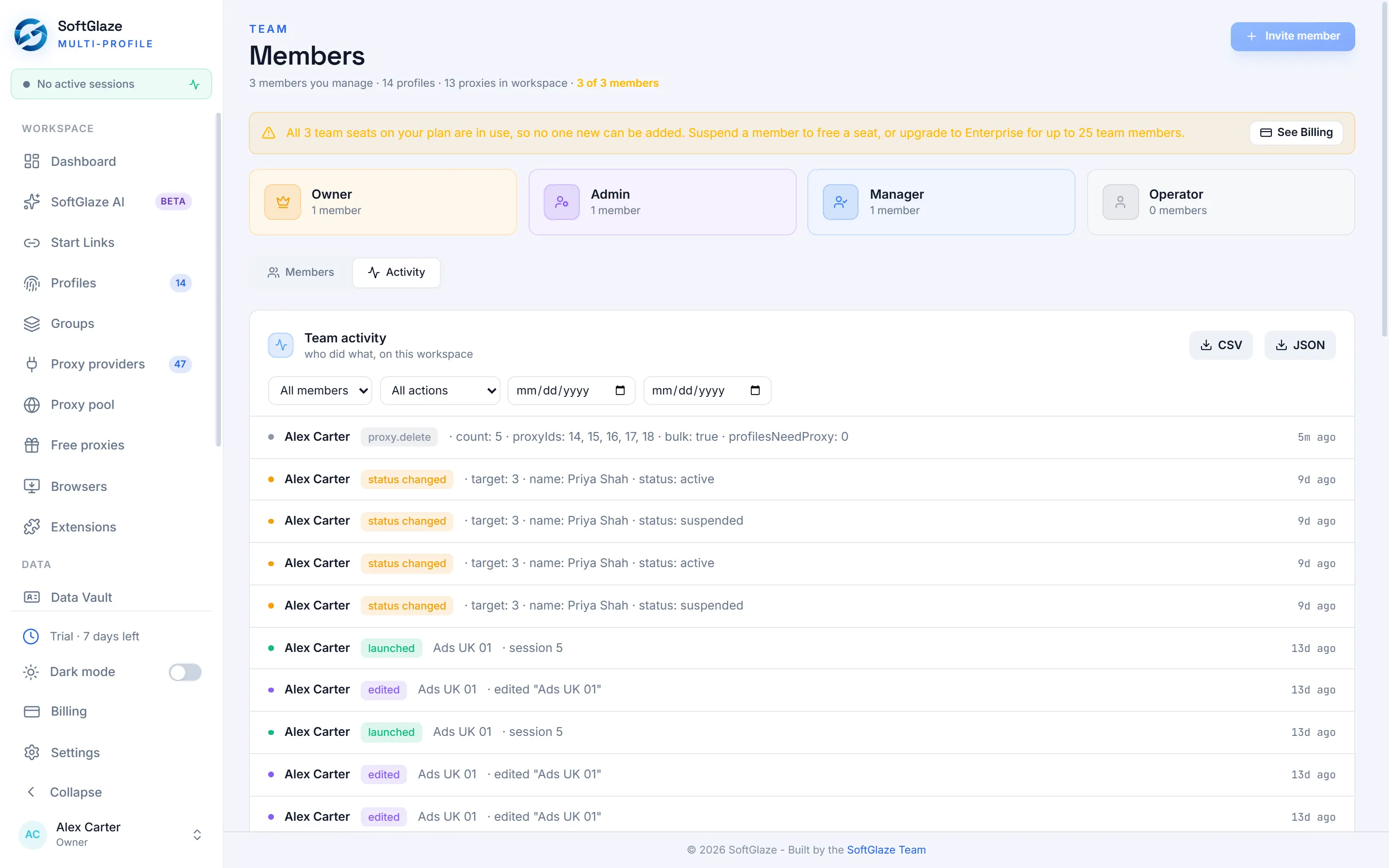
Team activity log: the newest entry is a proxy.delete with its raw details, then member status changes, with filters for member, action and dates, and CSV and JSON export buttons.Team activity log: the newest entry is a proxy.delete with its raw details, then member status changes, with filters for member, action and dates, and CSV and JSON export buttons.

共用為僅使用或可編輯

「使用(啟動)」允許成員開啟設定檔。「使用 + 編輯」允許他們修改。刪除權限仍屬於管理員及以上角色。

Edit member dialog for Jamie Lee: visible features, and action permissions such as launch, create, edit, export and share profiles with members, add or delete proxies, reveal raw proxy credentials, and run automation.Edit member dialog for Jamie Lee: visible features, and action permissions such as launch, create, edit, export and share profiles with members, add or delete proxies, reveal raw proxy credentials, and run automation.

隱藏的憑證

對經理以下的角色,代理登入資訊、Cookie 匯出和雙重驗證碼顯示為 ••••••••。設定檔仍然可以啟動。

每個帳號同一時間只有一個人

當一名成員開啟某個設定檔時,它會被鎖定給該成員,因此沒有人能為同一個客戶帳號再開第二個工作階段。

逐步操作
代理商在 SoftGlaze 中做的三項工作

Job 1

在第一個客戶之前設定好團隊

  1. 以所有者身分開啟「成員」並點選「邀請成員」。所有者最多可以新增 10 名管理員、10 名經理和 5 名操作員。
  2. 管理員可以在其下級新增經理和操作員,每種最多 5 名。經理最多可以新增 3 名操作員。
  3. 開啟某個成員的「權限和限額」,可以調低其設定檔、代理和開啟瀏覽器的限額,關閉單項操作,或從其側邊欄中隱藏「代理池」或「成員」等頁面。覆蓋設定只能移除權限,永遠不能新增超出該成員角色的權限。
  4. 每名成員在存放工作區的電腦上用自己的密碼登入。給成員設定 PIN 後,他們可以從成員選單切換進來。
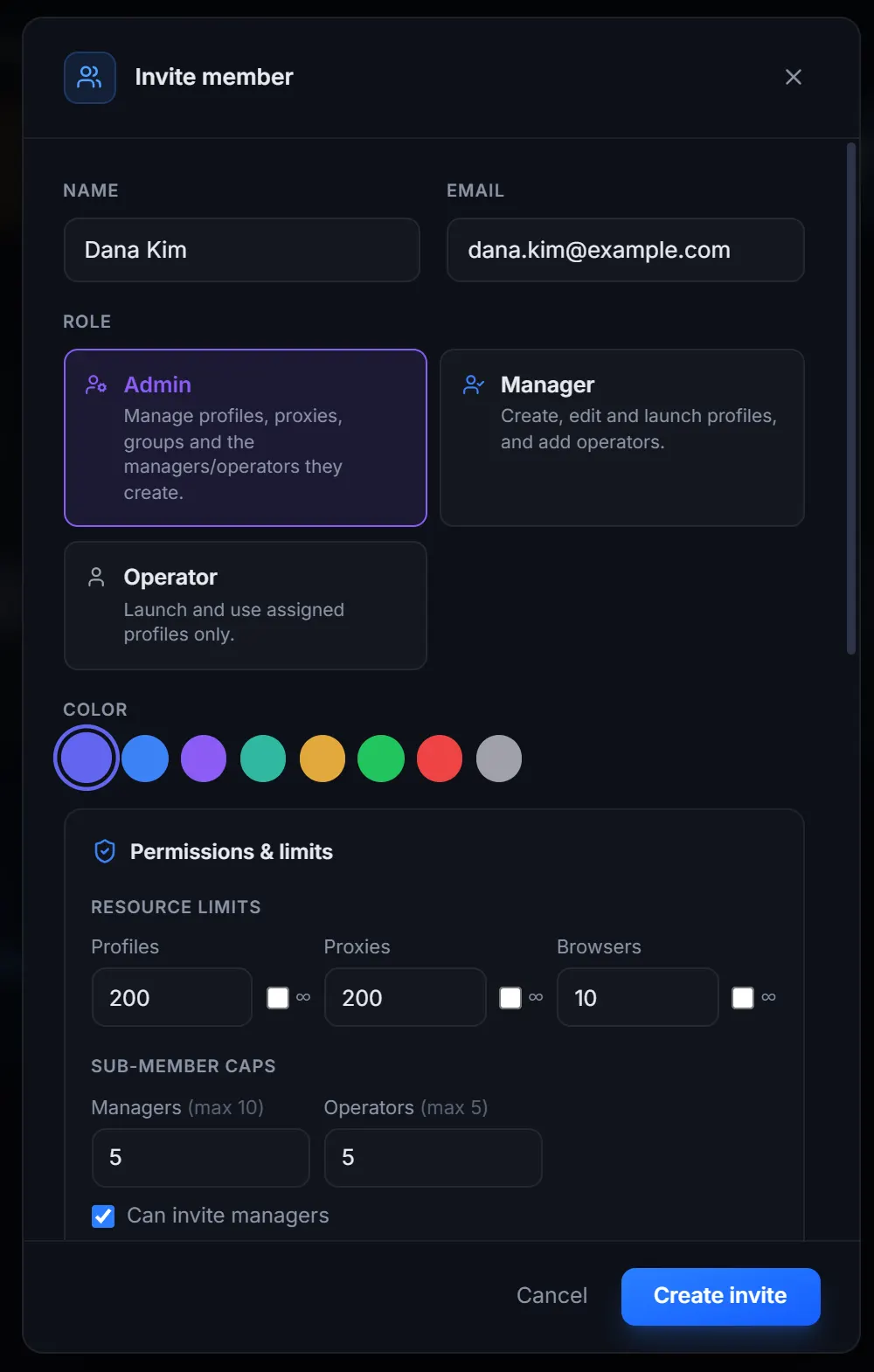
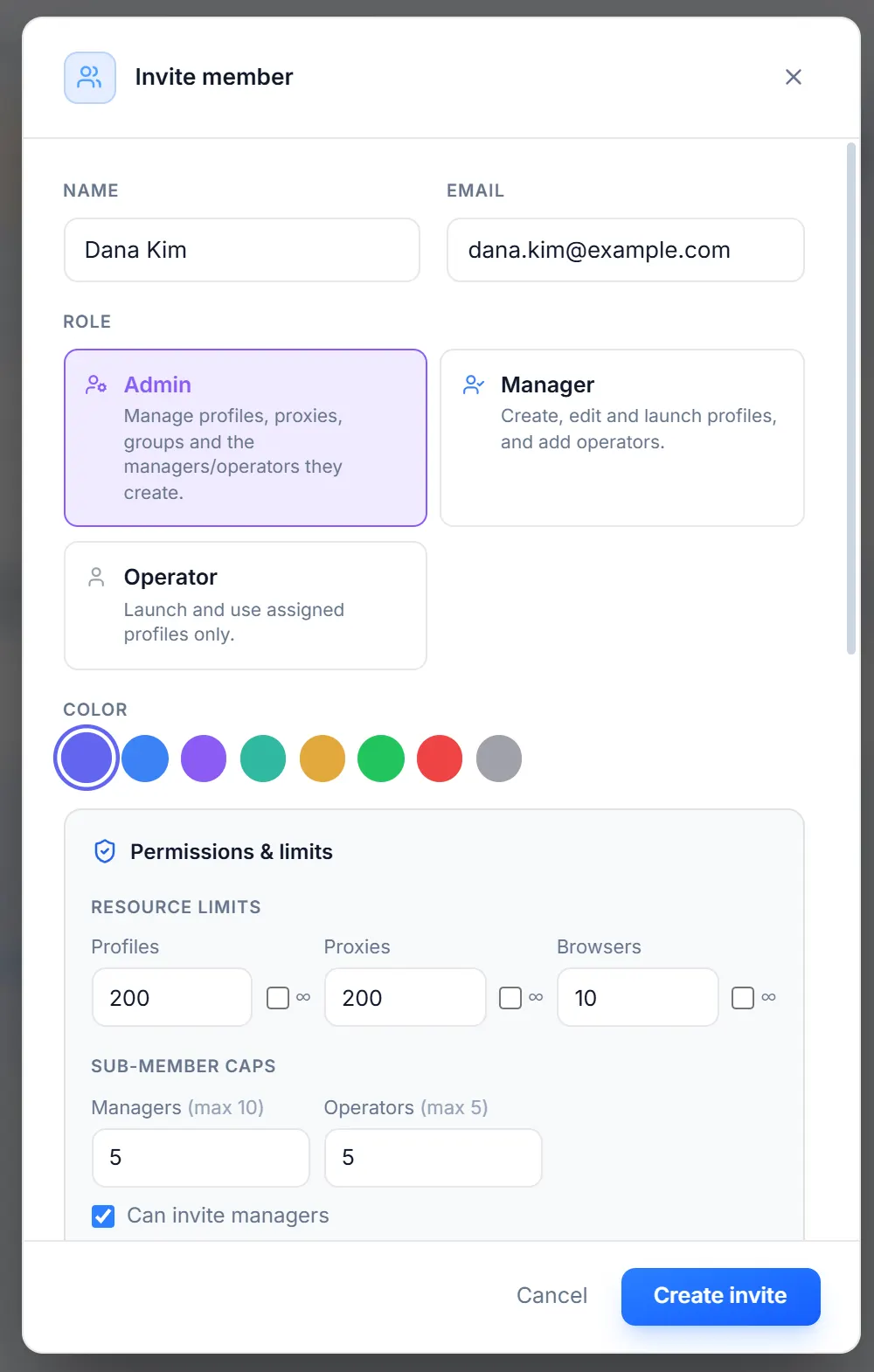
Invite member dialog for a demo member: name, email, role cards for Admin, Manager and Operator, a colour, and resource limits for profiles, proxies and browsers.Invite member dialog for a demo member: name, email, role cards for Admin, Manager and Operator, a colour, and resource limits for profiles, proxies and browsers.
Invite member: role and limits.
Job 2

一次完成新客戶的接入

  1. 為客戶建立一個群組。
  2. 從試算表(.xlsx、.xls 或 .csv,37 欄範本,儲存前可預覽)匯入客戶的帳號,或逐個建立設定檔。
  3. 為每個設定檔設定代理,逐個登入一次帳號,並把其雙重驗證種子儲存在設定檔上。
  4. 把該群組的設定檔共用給客戶經理和將負責這些帳號的員工(見下方演練)。
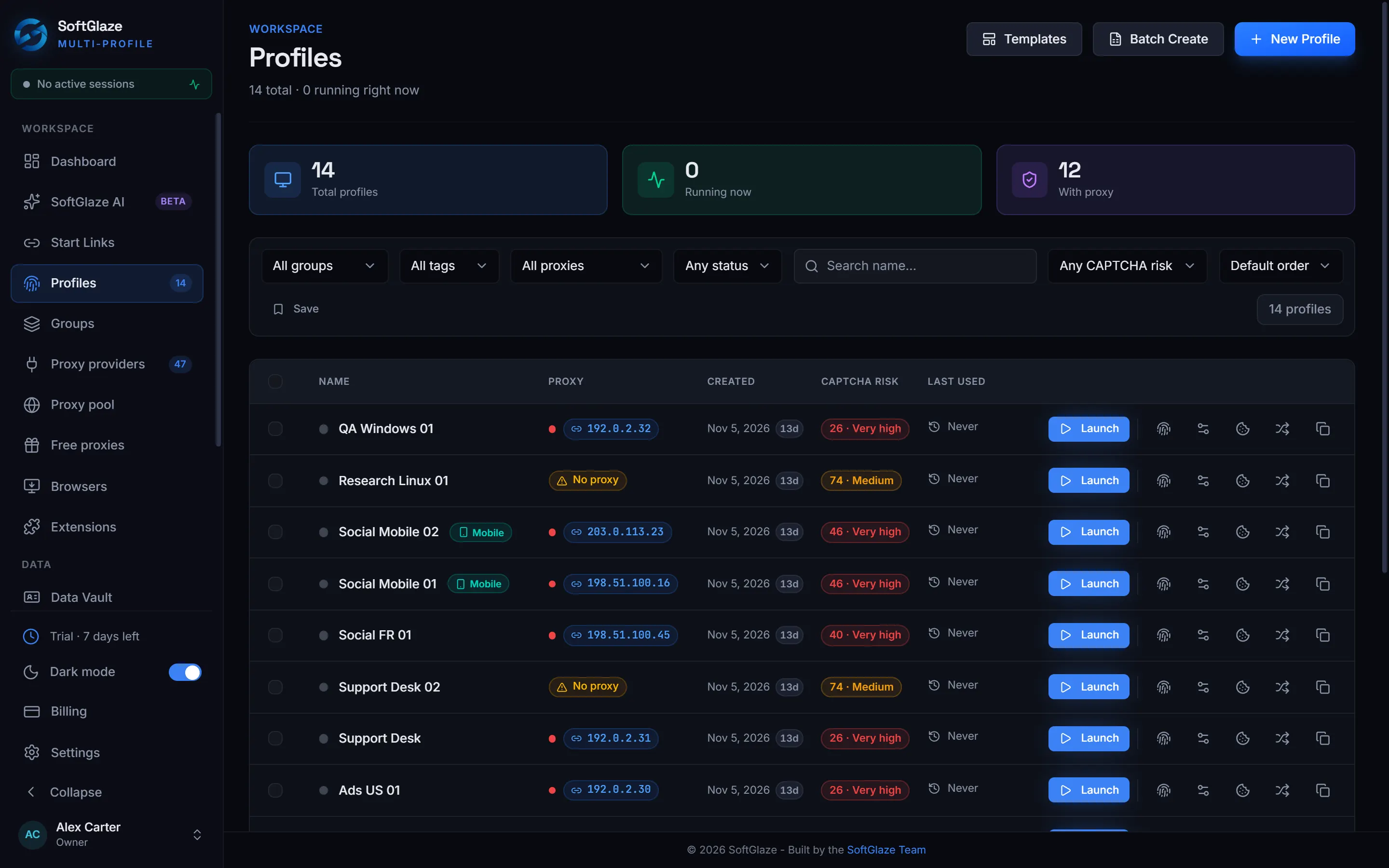
Profiles list with 14 demo profiles. Each row shows the profile name, its proxy, the created date, a captcha risk score and a Launch button; the demo proxies are test addresses that failed their check, so their rows show a red dot and a Very high risk.Profiles list with 14 demo profiles. Each row shows the profile name, its proxy, the created date, a captcha risk score and a Launch button; the demo proxies are test addresses that failed their check, so their rows show a red dot and a Very high risk.
Profiles list. The demo proxies are test addresses, so they fail their check.
Job 3

在月底回答「誰做了什麼」

  1. 在「成員」中開啟「團隊活動」。
  2. 按成員、操作(啟動、編輯、匯入、刪除等)和日期範圍篩選。
  3. 在 Enterprise 上,將結果匯出為 CSV 或 JSON,附在客戶報告中。
Team activity log: the newest entry is a proxy.delete with its raw details, then member status changes, with filters for member, action and dates, and CSV and JSON export buttons.Team activity log: the newest entry is a proxy.delete with its raw details, then member status changes, with filters for member, action and dates, and CSV and JSON export buttons.
Team activity, with CSV and JSON export on Enterprise.

演練

把客戶帳號交給同事,以及收回

  1. 共用給客戶經理,可使用和編輯

    選擇客戶的設定檔,選擇「與團隊成員共用」,選擇該經理,將「訪問級別」設為「使用 + 編輯」,然後點選「授予訪問權限」。經理可以看到代理登入資訊和雙重驗證碼,因為他們負責維護這些帳號。

  2. 共用給初級員工,僅使用

    同一個對話方塊,「訪問級別」設為「使用(啟動)」。初級員工啟動設定檔時已處於登入狀態;代理登入資訊、Cookie 匯出和雙重驗證碼顯示為 ••••••••。

  3. 每個帳號同一時間只有一個人

    當初級員工開啟某個設定檔時,它會被鎖定給他。其他人嘗試開啟時會被告知它正在使用中。

  4. 收回訪問權限

    再次開啟該對話方塊並點選「撤銷」。如果要完全禁止某人登入,就暫停他:「暫停此成員」會阻止其登入。

  5. 有人離職時

    移除該成員,並選擇「保留並重新分配給我」或「保留並重新分配給其他成員」。或者刪除他的資料:他的代理會被刪除,他的設定檔會移到回收站,可以從那裡恢復。

  6. 客戶離開時

    為客戶匯出活動記錄(在 Enterprise 上),然後請客戶修改帳號密碼和雙重驗證,因為你的團隊曾在這些帳號中工作。管理員可以把客戶的設定檔移到回收站;只有所有者可以將其永久清除。

Edit member dialog for Jamie Lee: visible features, and action permissions such as launch, create, edit, export and share profiles with members, add or delete proxies, reveal raw proxy credentials, and run automation.Edit member dialog for Jamie Lee: visible features, and action permissions such as launch, create, edit, export and share profiles with members, add or delete proxies, reveal raw proxy credentials, and run automation.
Edit member: visible features and action permissions.

設定清單

  • 安裝並建立所有者登入。Docs
  • 開啟資料庫加密並備份工作區。Docs
  • 了解每種角色能做什麼。Docs
  • 為每名成員設定限額和可見頁面。Docs
  • 共用你第一個客戶的設定檔。Docs
  • 了解有人離職時會發生什麼。Docs

可接受使用政策對代理商的規定

Allowed

  • 把每個客戶的帳號放在獨立的設定檔中,憑證留在客戶那裡。
  • 把設定檔交給同事或外包人員,而不交出背後的密碼。
  • 在客戶許可的情況下管理屬於客戶的帳號。

Not allowed

  • 建立或持有平台帳號用於出售或出租。
  • 轉售 SoftGlaze,或將其作為服務為他人執行。
  • 冒充他人、企業或官方機構。
  • 協助客戶重新進入因濫用而暫停或封禁其帳號的平台。

限制

它的邊界在哪裡

第一張卡片是本頁最重要的一句話。

一個工作區存放在一台電腦上

成員、角色和設定檔儲存在安裝 SoftGlaze 的那台電腦的資料庫中,邀請碼也是針對該資料庫兌換的。多個人可以使用同一個安裝;使用自己筆電電腦的員工不在你的工作區中。雲同步(如果你設定了自己的伺服器)同步的是設定檔,而不是成員。

隱藏不等於加密

憑證對經理以下的成員是隱藏的,但資料庫加密在你開啟之前是關閉的。在此之前,代理和帳號密碼以明文形式儲存在該資料庫中。

席位

試用期間 3 名成員,SoftGlaze Browser Pro 3 名,SoftGlaze Browser Enterprise 25 名,均含所有者。免費方案僅供所有者一人使用。超過 25 名的方案不在價格頁面上:請寄電子郵件至 support@softglaze.com,我們一起商量。

邀請電子郵件需要你的 SMTP

沒有它就不會傳送任何電子郵件,邀請碼會顯示在應用程式中,由你轉交。

Agencies questions

電子郵件支援

One business day, Monday to Friday for a first reply.

代理商如何在 SoftGlaze 中管理大量客戶帳號?

每個客戶帳號一個設定檔,按客戶群組,每個都有自己的 Cookie、裝置和代理。員工獲得一個角色,並且只能使用共用給他們的設定檔。

如何在不共用密碼的情況下給員工訪問權限?

登入帳號一次,然後把設定檔共用為僅使用。操作員啟動時已處於登入狀態,看到的代理登入資訊、Cookie 匯出和雙重驗證碼都是 ••••••••。

如何防止客戶工作階段混在一起?

把每個帳號放在自己的設定檔中。每個設定檔都把 Cookie 和儲存空間寫入自己的資料夾,一名成員開啟的設定檔會被鎖定給該成員,因此同一個帳號的兩個工作階段不能並排執行。

如何檢視誰在客戶帳號中做了什麼?

在「成員」中開啟「團隊活動」,按成員、操作和日期篩選,在 Enterprise 上可匯出為 CSV 或 JSON(Pro 可以檢視記錄但不能匯出)。它記錄啟動、編輯、匯入、刪除、成員變更和登入。

員工可以在自己的筆電電腦上工作嗎?

不能在同一個工作區中。成員儲存在安裝工作區的那台電腦上的工作區資料庫中,並且沒有託管的團隊伺服器。

一個工作區可以加入多少人?

試用期間 3 名,SoftGlaze Browser Pro 3 名,SoftGlaze Browser Enterprise 25 名,均含所有者。免費方案僅供所有者一人使用。超過 25 名請寄電子郵件至 support@softglaze.com。

在第一個客戶帳號放進來之前先設定好角色

先享 7 天完整 Pro(最多 3 名成員),之後是供一人使用的免費方案,無需信用卡,沒有時間限制。SoftGlaze Browser Enterprise 每個工作區每月 $29,最多 25 名成員並可匯出活動記錄;SoftGlaze Browser Pro 每月 $5,最多 3 名成員。