


Connecter Simply Proxies
SoftGlaze Browser builds Simply Proxies UK mobile logins on proxy.simplyproxies.com over SOCKS5, with the network and a sticky session in each.
Les fiches des fournisseurs, les guides de configuration et les prix sont en anglais.
Works with SoftGlaze Browser. SoftGlaze has no partnership with Simply Proxies and sells none of its proxies: you buy them from Simply Proxies and connect your own account.

Étape par étape
Comment connecter Simply Proxies
What you need: a Simply Proxies account with credit left (new accounts get 500 MB free), and the username and password from the Simply Proxies dashboard.
Find your username and password
Sign in to Simply Proxies. The Dashboard page shows your proxy username and password, ready to copy; the Connections tab builds example logins with a network and a session. New accounts get 500 MB of free traffic, valid for 14 days from the first proxy connection.
Open Simply Proxies in Proxy providers
In SoftGlaze Browser, open Proxy providers in the sidebar, search for Simply Proxies and select it. The Pull proxies tab holds the connector form.
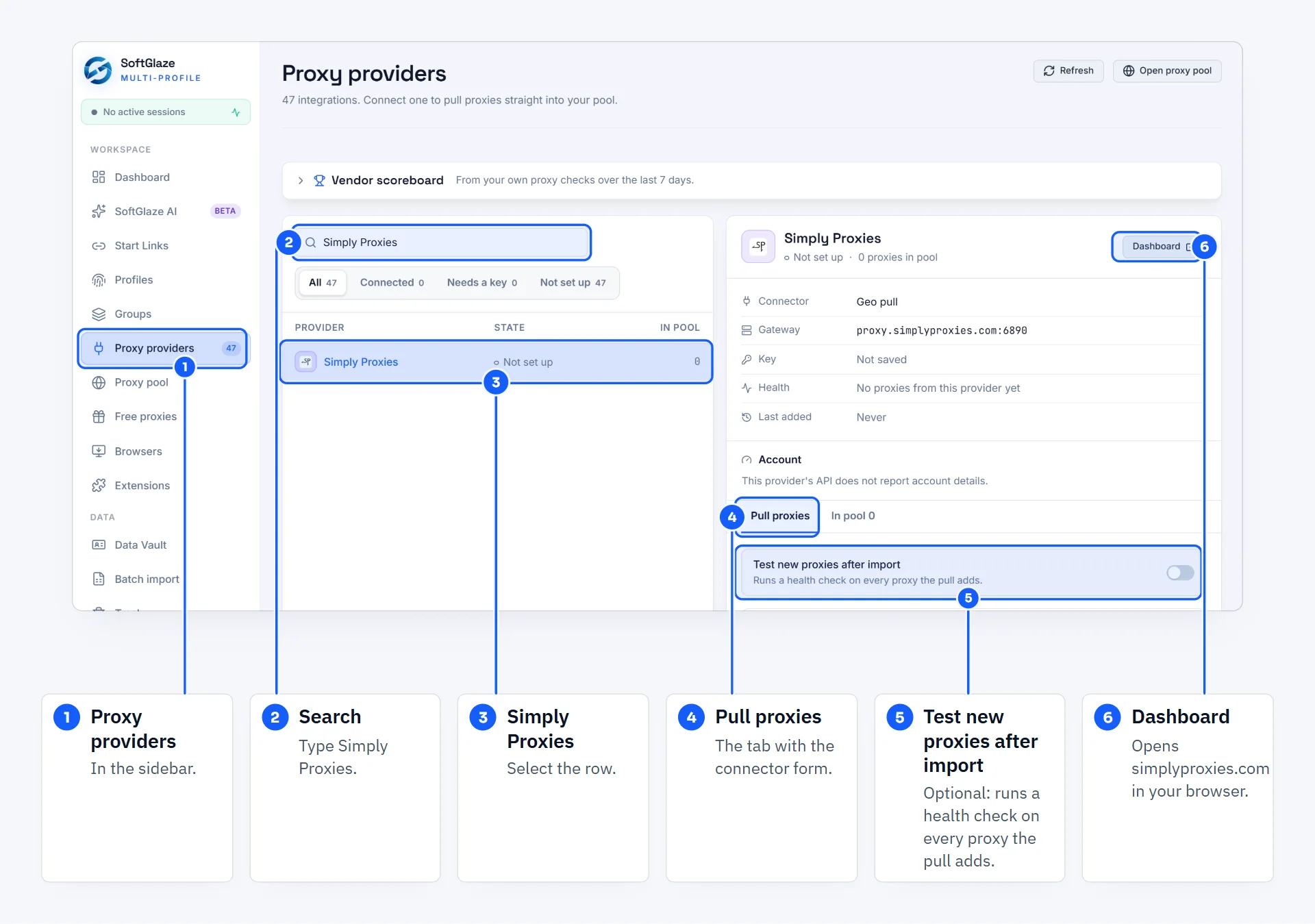

Proxy providers in SoftGlaze Browser.Taille réelleTaille réelle - Proxy providersIn the sidebar.
- SearchType Simply Proxies.
- Simply ProxiesSelect the row.
- Pull proxiesThe tab with the connector form.
- Test new proxies after importOptional: runs a health check on every proxy the pull adds.
- DashboardOpens simplyproxies.com in your browser.
Enter the proxy login
Type your Simply Proxies username, and only the username: the app adds the network and the session itself. Then type the password shown with it. Save credentials keeps them, encrypted, on this computer for the next pull.


The Connection part of the Simply Proxies connector, with placeholder values.Taille réelleTaille réelle - Proxy usernameThe proxy username from your dashboard.
- Proxy passwordThe proxy password from your dashboard.
- Save credentialsKeeps them, encrypted, on this computer.
Choose how many, the network and how long each keeps its IP, then pull
How many 1 with no session name and Keep same IP blank adds one rotating proxy; more than one adds that many sticky proxies, up to 1000. Pick Any network, or EE, O2, Vodafone or Three: if no device on that network is free, Simply Proxies refuses the connection. Sticky session is an optional name that pins one IP. Keep same IP sets 5 minutes to 12 hours; left blank, sticky proxies use Simply Proxies' default of 2 hours. There is no gateway or protocol to set. Then select Pull proxies.
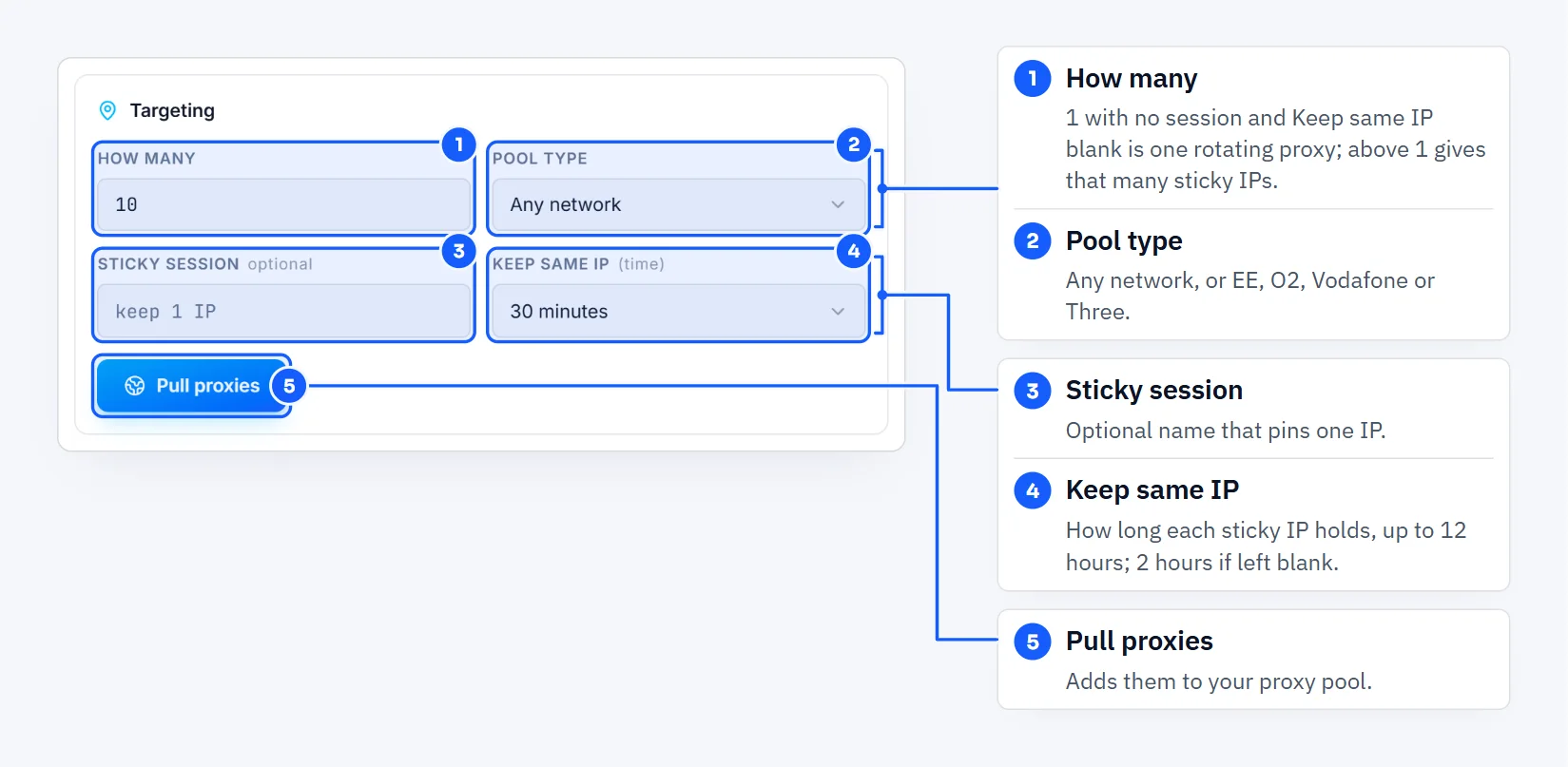

The Targeting part of the Simply Proxies connector, with placeholder values.Taille réelleTaille réelle - How many1 with no session and Keep same IP blank is one rotating proxy; above 1 gives that many sticky IPs.
- Pool typeAny network, or EE, O2, Vodafone or Three.
- Sticky sessionOptional name that pins one IP.
- Keep same IPHow long each sticky IP holds, up to 12 hours; 2 hours if left blank.
- Pull proxiesAdds them to your proxy pool.
Check what was added
The new proxies are listed under Added in the last pull: one SOCKS5 login per proxy on proxy.simplyproxies.com:6890, with the password hidden and the network and its own session in the username. They are in your Proxy pool, ready to check and to assign to profiles. By Simply Proxies' docs, SOCKS5 sends the proxy password in clear text.


A pull of 10 proxies in the United Kingdom, with a placeholder login. Passwords are hidden.Taille réelleTaille réelle - Added: 10New proxies in your pool.
- One login per proxyThe targeting and a session ride in the username.


Pas encore testé. Nous n’avons pas encore essayé ce connecteur avec un vrai compte Simply Proxies : il suit la documentation de Simply Proxies. Si un import échoue, dites-le-nous.
Le connecteur
Ce que fait SoftGlaze Browser avec Simply Proxies
Simply Proxies has no customer API. From your username and password, the app writes SOCKS5 logins for proxy.simplyproxies.com (port 6890) with the mobile network (any, EE, O2, Vodafone or Three) and a sticky session of 5 minutes to 12 hours in the username.
Only SOCKS5 is used: the connector does not offer Simply Proxies' HTTPS endpoint (port 6889) yet.
- Comment l’application ajoute les proxys
- Identifiants créés sur la passerelle du fournisseur
- Maximum par import
- 1,000. The app writes the logins itself, so a pull makes no call to Simply Proxies. Simply Proxies caps sticky sessions at a third of its device pool
- Protocoles
- SOCKS5
- Rotation
- How many 1 with no session name and Keep same IP blank adds one rotating login: Simply Proxies sends each request through a different device, so the IP changes every time.
- Sessions persistantes
- Each sticky login carries a session ID and, if you pick one, a time from 5 minutes to 12 hours. Simply Proxies' docs: the window is 2 hours by default on SOCKS5 and slides forward with each new connection on the same session; it is not promised, and sticky sessions are capped at a third of the pool.
- Emplacements
- United Kingdom only, on real devices on the EE, O2, Vodafone and Three networks. You pick a network or Any network; Simply Proxies documents no city or region targeting.
- Passerelle
- proxy.simplyproxies.com:6890
| Champ dans l’application | Quoi saisir | Où le trouver |
|---|---|---|
| Proxy username | Your Simply Proxies username, and only the username: the app adds the network and the session itself. | Simply Proxies dashboard, after you sign in. The Connections tab builds example logins from the same username. |
| Proxy passwordSecret | The password shown with that username. | The same dashboard page, next to the username. |
| How many | 1 to 1000. One, with no session name and Keep same IP blank, adds one rotating proxy; more than one adds that many sticky proxies. | Your choice. The field starts at 5. |
| Pool type | Any network, or EE, O2, Vodafone or Three. | Your choice. If no device on that network is free, Simply Proxies refuses the connection rather than using another network. |
| Sticky sessionFacultatif | Optional name that pins one device and IP. Leave it empty and the app makes one session per proxy. | Your choice. |
| Keep same IPFacultatif | 5 minutes to 12 hours. Left blank, sticky proxies use Simply Proxies' default of 2 hours (the option then reads Default (2 hours)). | Your choice. |
Nothing is sent to Simply Proxies when you pull: the app builds the logins on your computer. Your password reaches Simply Proxies' SOCKS5 gateway only when a profile uses one of these proxies or the app checks one. It is saved encrypted on your computer and never sent to SoftGlaze.
Produits
Types de proxy et fonctionnalités
Marqués « Dans l’application » : les types que le connecteur Simply Proxies peut ajouter à votre pool.
UK mobile proxies
Dans l’applicationReal UK 4G and 5G devices on EE, O2, Vodafone and Three, billed per GB from a credit balance.
Custom volume
For more than 50 GB: dedicated UK hardware at negotiated rates, on request.
- One gateway, proxy.simplyproxies.com: HTTPS on port 6889 (TLS to the proxy) and SOCKS5 on port 6890, with the same login.
- Network choice in the username: EE, O2, Vodafone or Three.
- Without a session, every request goes through a different device; a session ID pins one device and IP.
- Sticky window of 2 hours by default on SOCKS5, or 5 minutes to 12 hours; it slides forward with each new connection.
- A Connections tab in the dashboard builds logins and code samples for cURL, Python, Node.js, Go and Rust.
- Simply Proxies says it served more than 9,000 unique UK mobile IPs in the last 90 days.
Tarifs
Prix de Simply Proxies
Vous payez directement Simply Proxies. SoftGlaze ne vend pas de proxys et n’ajoute rien à ces prix. Les prix changent : vérifiez la page de Simply Proxies avant d’acheter.
| Produit | Prix | Unité | Forfait ou minimum | Remarques |
|---|---|---|---|---|
| Starter | £2.00 / GB | per GB | £6 for 3 GB | |
| Standard | £2.00 / GB | per GB | £10 for 5 GB | |
| Value | £1.80 / GB | per GB | £18 for 10 GB | |
| Growth | £1.70 / GB | per GB | £34 for 20 GB | |
| Scale | £1.60 / GB | per GB | £80 for 50 GB | More than 50 GB: custom volume pricing, by contact. |
| Free trial | £0 | 500 MB | New accounts | No card. Valid for 14 days from the first proxy connection. |
Credit is bought in bundles and never expires; only the free 500 MB expires. The first top-up gets a 50% bonus, once per account (buy 20 GB, get 30 GB). Prices are in pounds sterling. The pricing page does not mention VAT; the terms mention reverse charge for some business customers outside the UK. Pay by card or PayPal.
Confiance
Avantages et inconvénients de Simply Proxies
Des faits tirés des pages et conditions de Simply Proxies, et des faits sur le connecteur tirés du code de l’application. Aucune note.
Avantages
- Pay as you go with no subscription; purchased credit never expires.
- 500 MB free for new accounts, with no card.
- Network choice per login: EE, O2, Vodafone or Three.
- Sticky sessions from 5 minutes to 12 hours, at no extra cost.
- Simply Proxies says the proxies run on its own UK devices with their own SIM cards, not on a peer-to-peer pool.
- Consumers have a 14-day right to cancel unredeemed credit, by the terms.
Inconvénients
- United Kingdom IPs only.
- The app uses the SOCKS5 endpoint, which sends the proxy password in clear text, by Simply Proxies' docs. The HTTPS endpoint, which keeps it inside TLS, is not used by the app.
- Sticky sessions are capped at a third of the pool, and the sticky window is not promised.
- If no device is free on the network you pick, the connection is refused.
- Credits are non-refundable outside the 14-day cancellation right and the cases the terms name.
- The connector cannot show your balance or traffic left: Simply Proxies' docs describe no customer API.
Adéquation
Quand Simply Proxies est un bon choix
Bon choix si
- You need UK mobile IPs and want to choose the carrier: EE, O2, Vodafone or Three.
- You want to pay per GB with credit that does not expire.
- Your profiles need the same IP for minutes or hours, up to 12.
Moins adapté si
- You need IPs outside the United Kingdom.
- You need many sticky profiles at once: sticky sessions are capped at a third of Simply Proxies' pool.
- You need city or region targeting inside the UK: Simply Proxies documents network choice only.
FAQ
Questions sur Simply Proxies dans SoftGlaze Browser
Which login does the app need?
The username and password from your Simply Proxies dashboard. Enter the username on its own: the app adds the network and a session to it for each proxy.
Why are all the proxies SOCKS5?
Simply Proxies offers HTTPS on port 6889 and SOCKS5 on port 6890. The connector uses SOCKS5 only and does not offer port 6889 yet. Simply Proxies' docs note that SOCKS5 sends the password in clear text.
How long does a sticky proxy keep its IP?
The time you pick in Keep same IP, from 5 minutes to 12 hours. Left blank, Simply Proxies keeps it for 2 hours. The window slides forward with each new connection on the same session, and Simply Proxies does not promise it.
What happens if I pick a network with no free device?
Simply Proxies refuses the connection instead of sending it through another network. Choose Any network, or try again later.
- Intégration
SimplyNode
SoftGlaze Browser asks SimplyNode's API for residential or mobile proxies from one of your sub-accounts: one rotating proxy, or up to 50 sticky ones per pull, held for up to an hour.
- Résidentiel
- Mobile
dès$4.00 / GB
Essai reçu, test prévu  Nous a fait confiance deux fois: Ce fournisseur nous a donné un accès de test plus d’une fois, ce qui nous permet de continuer à tester le connecteur.Intégration
Singapore Mobile Proxy
SoftGlaze Browser imports one proxy per modem on your Singapore Mobile Proxy account with your client API key, each with its rotation link.
- Mobile
dès$40
Testé- Intégration
Zokol
SoftGlaze Browser imports the French mobile proxies on your Zokol account with an API key, with the rotation link of each dedicated proxy.
- Mobile
dès€13.9 / month
Essai reçu, test prévu