


连接 Simply Proxies
SoftGlaze Browser builds Simply Proxies UK mobile logins on proxy.simplyproxies.com over SOCKS5, with the network and a sticky session in each.
服务商条目、设置指南和价格为英文。
Works with SoftGlaze Browser. SoftGlaze has no partnership with Simply Proxies and sells none of its proxies: you buy them from Simply Proxies and connect your own account.

分步说明
如何连接 Simply Proxies
What you need: a Simply Proxies account with credit left (new accounts get 500 MB free), and the username and password from the Simply Proxies dashboard.
Find your username and password
Sign in to Simply Proxies. The Dashboard page shows your proxy username and password, ready to copy; the Connections tab builds example logins with a network and a session. New accounts get 500 MB of free traffic, valid for 14 days from the first proxy connection.
Open Simply Proxies in Proxy providers
In SoftGlaze Browser, open Proxy providers in the sidebar, search for Simply Proxies and select it. The Pull proxies tab holds the connector form.
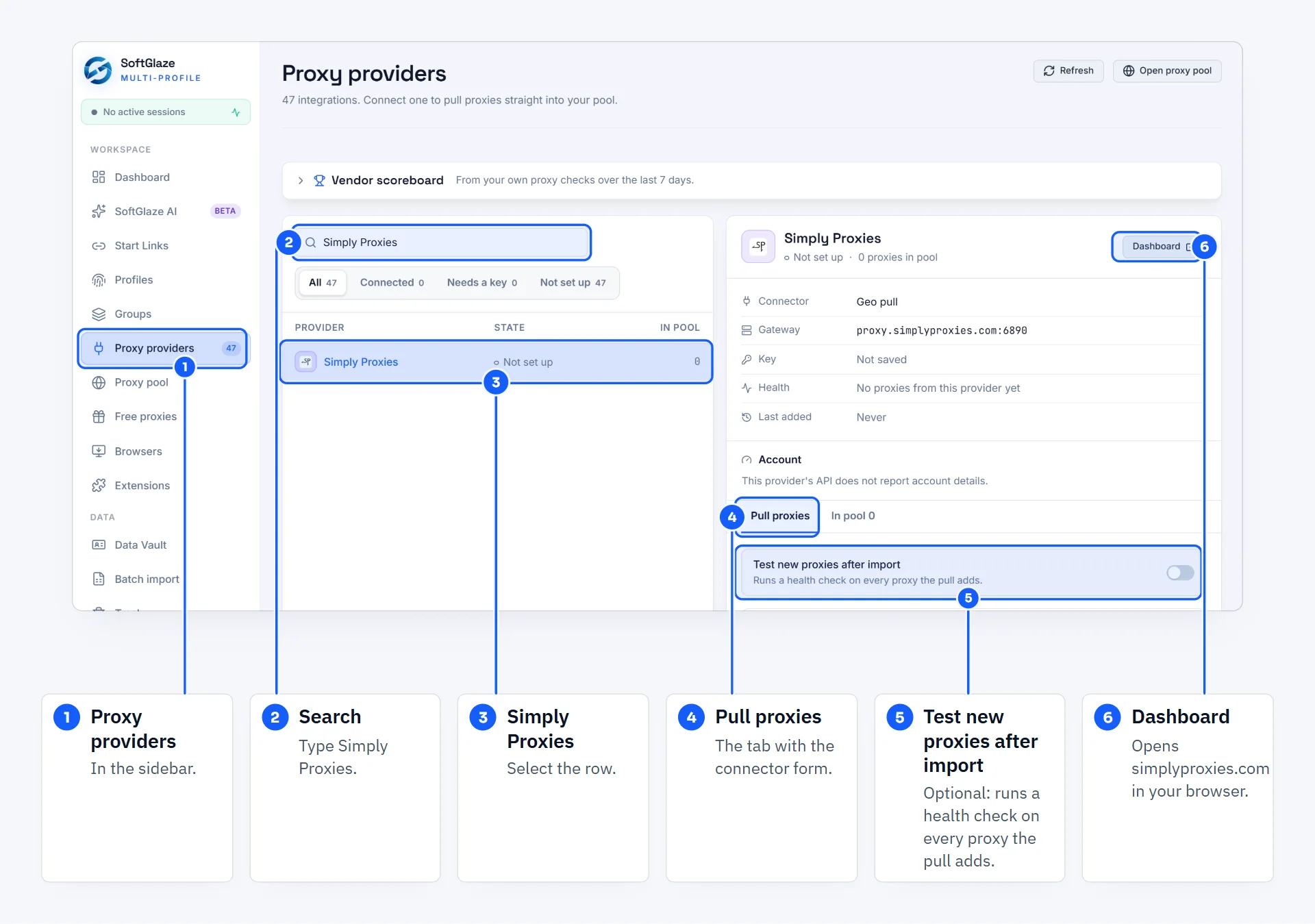

Proxy providers in SoftGlaze Browser.查看原图查看原图 - Proxy providersIn the sidebar.
- SearchType Simply Proxies.
- Simply ProxiesSelect the row.
- Pull proxiesThe tab with the connector form.
- Test new proxies after importOptional: runs a health check on every proxy the pull adds.
- DashboardOpens simplyproxies.com in your browser.
Enter the proxy login
Type your Simply Proxies username, and only the username: the app adds the network and the session itself. Then type the password shown with it. Save credentials keeps them, encrypted, on this computer for the next pull.


The Connection part of the Simply Proxies connector, with placeholder values.查看原图查看原图 - Proxy usernameThe proxy username from your dashboard.
- Proxy passwordThe proxy password from your dashboard.
- Save credentialsKeeps them, encrypted, on this computer.
Choose how many, the network and how long each keeps its IP, then pull
How many 1 with no session name and Keep same IP blank adds one rotating proxy; more than one adds that many sticky proxies, up to 1000. Pick Any network, or EE, O2, Vodafone or Three: if no device on that network is free, Simply Proxies refuses the connection. Sticky session is an optional name that pins one IP. Keep same IP sets 5 minutes to 12 hours; left blank, sticky proxies use Simply Proxies' default of 2 hours. There is no gateway or protocol to set. Then select Pull proxies.
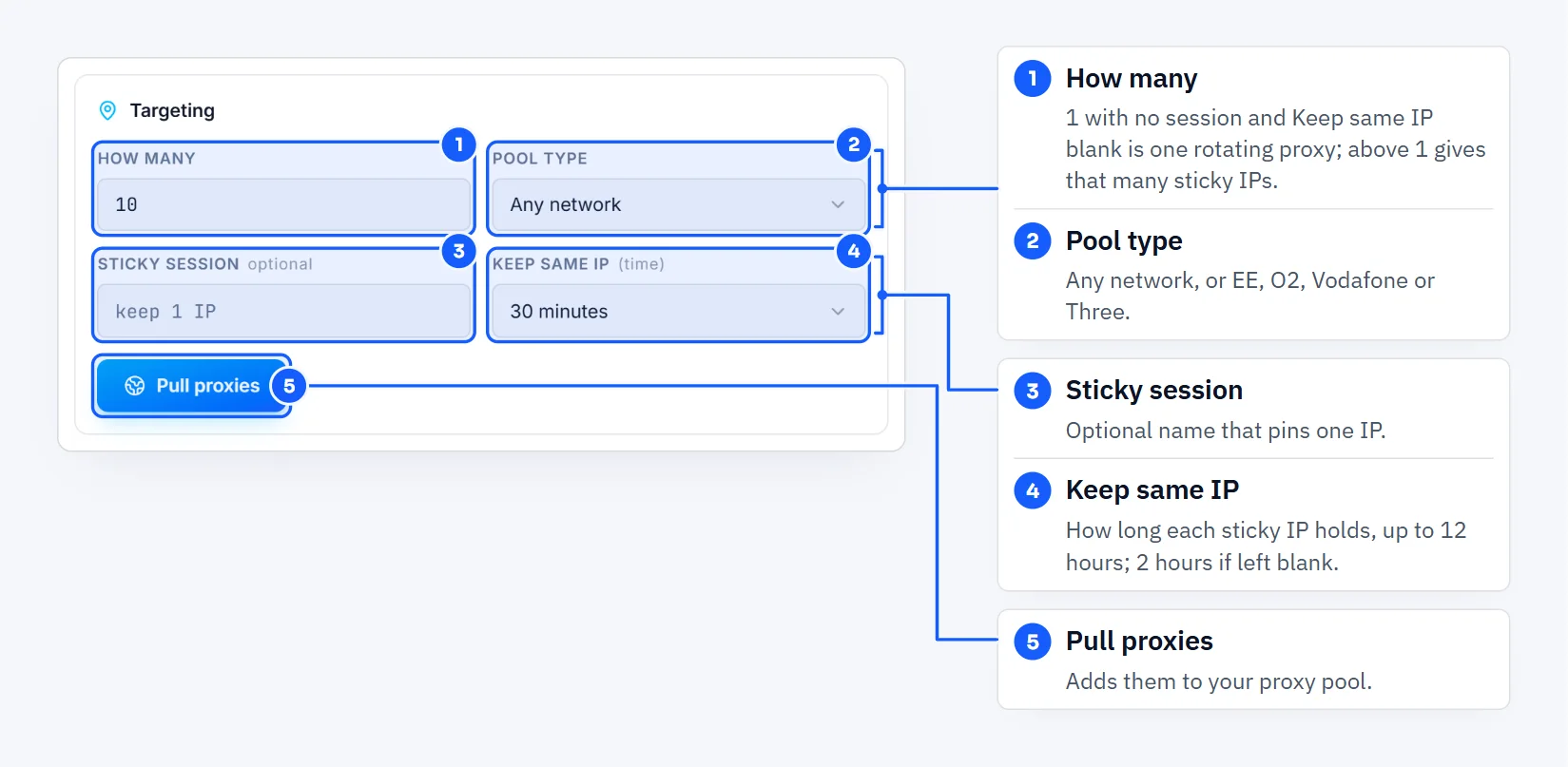

The Targeting part of the Simply Proxies connector, with placeholder values.查看原图查看原图 - How many1 with no session and Keep same IP blank is one rotating proxy; above 1 gives that many sticky IPs.
- Pool typeAny network, or EE, O2, Vodafone or Three.
- Sticky sessionOptional name that pins one IP.
- Keep same IPHow long each sticky IP holds, up to 12 hours; 2 hours if left blank.
- Pull proxiesAdds them to your proxy pool.
Check what was added
The new proxies are listed under Added in the last pull: one SOCKS5 login per proxy on proxy.simplyproxies.com:6890, with the password hidden and the network and its own session in the username. They are in your Proxy pool, ready to check and to assign to profiles. By Simply Proxies' docs, SOCKS5 sends the proxy password in clear text.


A pull of 10 proxies in the United Kingdom, with a placeholder login. Passwords are hidden.查看原图查看原图 - Added: 10New proxies in your pool.
- One login per proxyThe targeting and a session ride in the username.


尚未测试。我们还没有用真实的 Simply Proxies 账户试过这个连接器:它依据 Simply Proxies 的文档编写。如果拉取失败,请告诉我们。
连接器
SoftGlaze Browser 对 Simply Proxies 做什么
Simply Proxies has no customer API. From your username and password, the app writes SOCKS5 logins for proxy.simplyproxies.com (port 6890) with the mobile network (any, EE, O2, Vodafone or Three) and a sticky session of 5 minutes to 12 hours in the username.
Only SOCKS5 is used: the connector does not offer Simply Proxies' HTTPS endpoint (port 6889) yet.
- 应用如何添加代理
- 在服务商网关上生成的登录信息
- 每次拉取上限
- 1,000. The app writes the logins itself, so a pull makes no call to Simply Proxies. Simply Proxies caps sticky sessions at a third of its device pool
- 协议
- SOCKS5
- 轮换
- How many 1 with no session name and Keep same IP blank adds one rotating login: Simply Proxies sends each request through a different device, so the IP changes every time.
- 粘性会话
- Each sticky login carries a session ID and, if you pick one, a time from 5 minutes to 12 hours. Simply Proxies' docs: the window is 2 hours by default on SOCKS5 and slides forward with each new connection on the same session; it is not promised, and sticky sessions are capped at a third of the pool.
- 地区
- United Kingdom only, on real devices on the EE, O2, Vodafone and Three networks. You pick a network or Any network; Simply Proxies documents no city or region targeting.
- 网关
- proxy.simplyproxies.com:6890
| 应用中的字段 | 填写内容 | 在哪里找到 |
|---|---|---|
| Proxy username | Your Simply Proxies username, and only the username: the app adds the network and the session itself. | Simply Proxies dashboard, after you sign in. The Connections tab builds example logins from the same username. |
| Proxy password机密 | The password shown with that username. | The same dashboard page, next to the username. |
| How many | 1 to 1000. One, with no session name and Keep same IP blank, adds one rotating proxy; more than one adds that many sticky proxies. | Your choice. The field starts at 5. |
| Pool type | Any network, or EE, O2, Vodafone or Three. | Your choice. If no device on that network is free, Simply Proxies refuses the connection rather than using another network. |
| Sticky session可选 | Optional name that pins one device and IP. Leave it empty and the app makes one session per proxy. | Your choice. |
| Keep same IP可选 | 5 minutes to 12 hours. Left blank, sticky proxies use Simply Proxies' default of 2 hours (the option then reads Default (2 hours)). | Your choice. |
Nothing is sent to Simply Proxies when you pull: the app builds the logins on your computer. Your password reaches Simply Proxies' SOCKS5 gateway only when a profile uses one of these proxies or the app checks one. It is saved encrypted on your computer and never sent to SoftGlaze.
产品
代理类型和功能
标记为“应用内”:Simply Proxies 连接器可添加到你代理池的类型。
UK mobile proxies
应用内Real UK 4G and 5G devices on EE, O2, Vodafone and Three, billed per GB from a credit balance.
Custom volume
For more than 50 GB: dedicated UK hardware at negotiated rates, on request.
- One gateway, proxy.simplyproxies.com: HTTPS on port 6889 (TLS to the proxy) and SOCKS5 on port 6890, with the same login.
- Network choice in the username: EE, O2, Vodafone or Three.
- Without a session, every request goes through a different device; a session ID pins one device and IP.
- Sticky window of 2 hours by default on SOCKS5, or 5 minutes to 12 hours; it slides forward with each new connection.
- A Connections tab in the dashboard builds logins and code samples for cURL, Python, Node.js, Go and Rust.
- Simply Proxies says it served more than 9,000 unique UK mobile IPs in the last 90 days.
价格
Simply Proxies 价格
你直接向 Simply Proxies 付款。SoftGlaze 不销售代理,也不在这些价格上加价。价格会变动,购买前请查看 Simply Proxies 的页面。
| 产品 | 价格 | 单位 | 套餐或最低要求 | 备注 |
|---|---|---|---|---|
| Starter | £2.00 / GB | per GB | £6 for 3 GB | |
| Standard | £2.00 / GB | per GB | £10 for 5 GB | |
| Value | £1.80 / GB | per GB | £18 for 10 GB | |
| Growth | £1.70 / GB | per GB | £34 for 20 GB | |
| Scale | £1.60 / GB | per GB | £80 for 50 GB | More than 50 GB: custom volume pricing, by contact. |
| Free trial | £0 | 500 MB | New accounts | No card. Valid for 14 days from the first proxy connection. |
Credit is bought in bundles and never expires; only the free 500 MB expires. The first top-up gets a 50% bonus, once per account (buy 20 GB, get 30 GB). Prices are in pounds sterling. The pricing page does not mention VAT; the terms mention reverse charge for some business customers outside the UK. Pay by card or PayPal.
可信度
Simply Proxies 的优缺点
来自 Simply Proxies 自己的页面和条款的事实,以及来自应用代码的连接器事实。不含评分。
优点
- Pay as you go with no subscription; purchased credit never expires.
- 500 MB free for new accounts, with no card.
- Network choice per login: EE, O2, Vodafone or Three.
- Sticky sessions from 5 minutes to 12 hours, at no extra cost.
- Simply Proxies says the proxies run on its own UK devices with their own SIM cards, not on a peer-to-peer pool.
- Consumers have a 14-day right to cancel unredeemed credit, by the terms.
缺点
- United Kingdom IPs only.
- The app uses the SOCKS5 endpoint, which sends the proxy password in clear text, by Simply Proxies' docs. The HTTPS endpoint, which keeps it inside TLS, is not used by the app.
- Sticky sessions are capped at a third of the pool, and the sticky window is not promised.
- If no device is free on the network you pick, the connection is refused.
- Credits are non-refundable outside the 14-day cancellation right and the cases the terms name.
- The connector cannot show your balance or traffic left: Simply Proxies' docs describe no customer API.
适用性
Simply Proxies 适合的情况
适合的情况
- You need UK mobile IPs and want to choose the carrier: EE, O2, Vodafone or Three.
- You want to pay per GB with credit that does not expire.
- Your profiles need the same IP for minutes or hours, up to 12.
不太适合的情况
- You need IPs outside the United Kingdom.
- You need many sticky profiles at once: sticky sessions are capped at a third of Simply Proxies' pool.
- You need city or region targeting inside the UK: Simply Proxies documents network choice only.
常见问题
关于在 SoftGlaze Browser 中使用 Simply Proxies 的问题
Which login does the app need?
The username and password from your Simply Proxies dashboard. Enter the username on its own: the app adds the network and a session to it for each proxy.
Why are all the proxies SOCKS5?
Simply Proxies offers HTTPS on port 6889 and SOCKS5 on port 6890. The connector uses SOCKS5 only and does not offer port 6889 yet. Simply Proxies' docs note that SOCKS5 sends the password in clear text.
How long does a sticky proxy keep its IP?
The time you pick in Keep same IP, from 5 minutes to 12 hours. Left blank, Simply Proxies keeps it for 2 hours. The window slides forward with each new connection on the same session, and Simply Proxies does not promise it.
What happens if I pick a network with no free device?
Simply Proxies refuses the connection instead of sending it through another network. Choose Any network, or try again later.
- 集成
SimplyNode
SoftGlaze Browser asks SimplyNode's API for residential or mobile proxies from one of your sub-accounts: one rotating proxy, or up to 50 sticky ones per pull, held for up to an hour.
- 住宅
- 移动
起价$4.00 / GB
已收到试用,计划测试  两次提供试用: 该服务商不止一次向我们提供测试权限,因此我们可以持续测试连接器。集成
Singapore Mobile Proxy
SoftGlaze Browser imports one proxy per modem on your Singapore Mobile Proxy account with your client API key, each with its rotation link.
- 移动
起价$40
已测试- 集成
Zokol
SoftGlaze Browser imports the French mobile proxies on your Zokol account with an API key, with the rotation link of each dedicated proxy.
- 移动
起价€13.9 / month
已收到试用,计划测试