


เชื่อมต่อ Froxy
SoftGlaze Browser builds Froxy proxies on proxy.froxy.com from the login and password in your Froxy dashboard, one port per sticky exit IP.
รายการผู้ให้บริการ คู่มือการตั้งค่า และราคาเป็นภาษาอังกฤษ
Works with SoftGlaze Browser. SoftGlaze has no partnership with Froxy and sells none of its proxies: you buy them from Froxy and connect your own account.

ทีละขั้นตอน
วิธีเชื่อมต่อ Froxy
What you need: a Froxy Residential, Mobile or Datacenter plan, that plan's login and password, and the public IP of this computer on the plan's IP Whitelist. Froxy's help says these plans accept connections only from whitelisted IPs.
Allow this computer and copy the plan login
In the Froxy dashboard, open My Subscriptions and select Manage on your plan. Under IP Whitelist, select Edit, add the public IP of the computer that runs SoftGlaze Browser and save: Froxy's help says Residential, Mobile and Datacenter plans accept connections only from whitelisted IPs, 3 per plan. Set IP Rotation there if you want a shorter time than 3600 seconds. Then copy the plan's login and password; the Export Proxy List tab shows them too.
Open Froxy in Proxy providers
In SoftGlaze Browser, open Proxy providers in the sidebar, search for Froxy and select it. The Dashboard button opens Froxy's site in your browser.
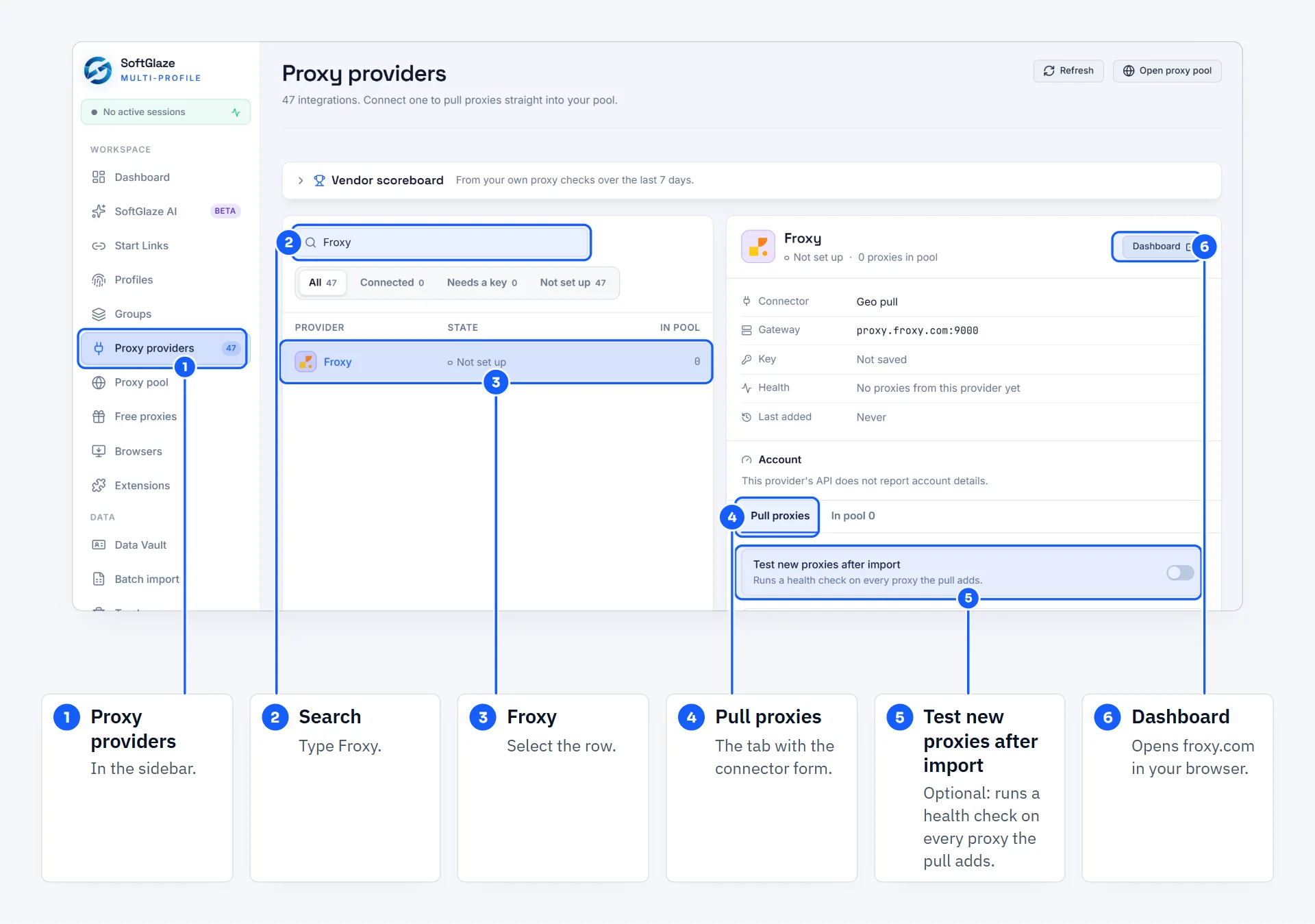
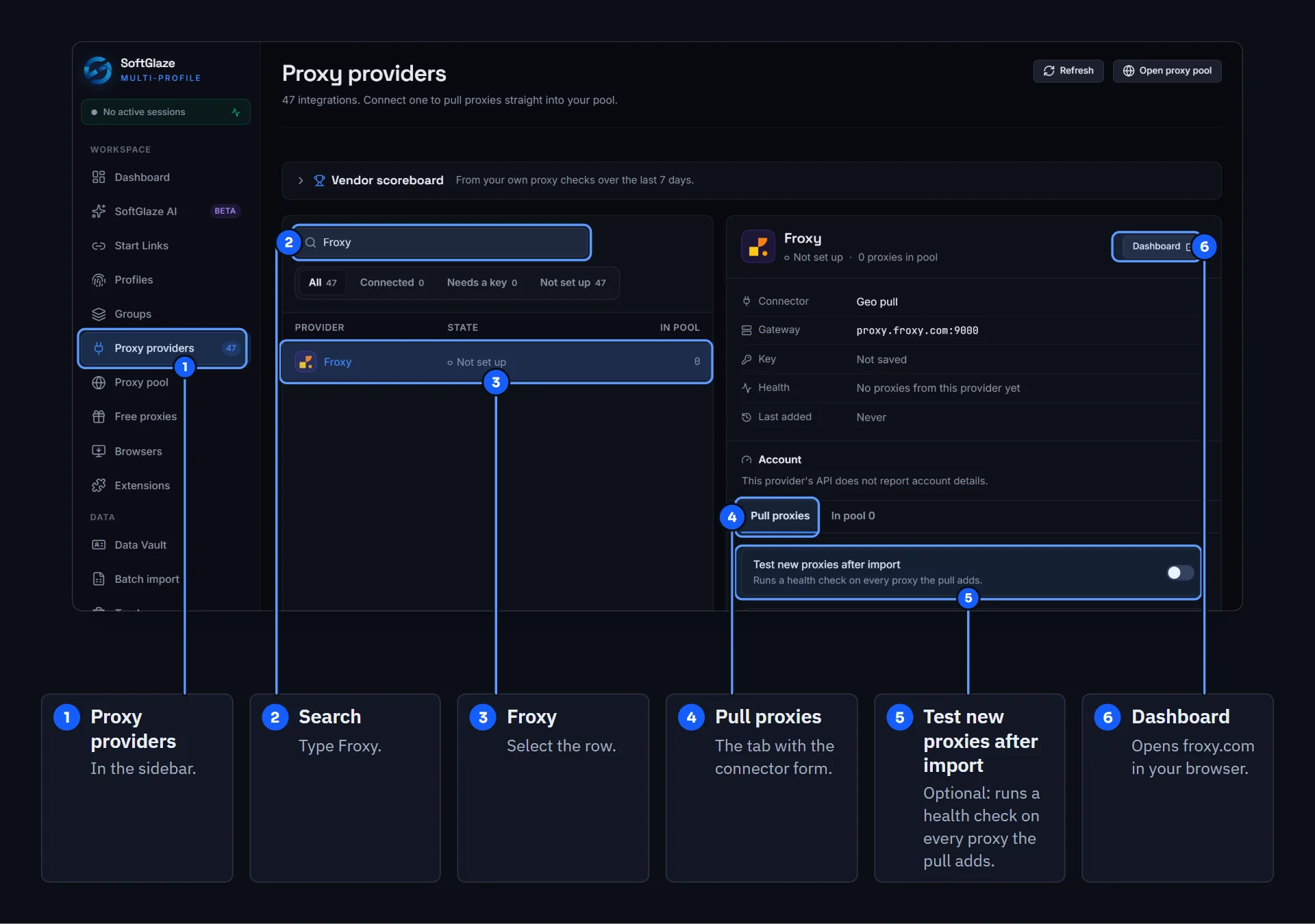
Proxy providers in SoftGlaze Browser.ขนาดเต็มขนาดเต็ม - Proxy providersIn the sidebar.
- SearchType Froxy.
- FroxySelect the row.
- Pull proxiesThe tab with the connector form.
- Test new proxies after importOptional: runs a health check on every proxy the pull adds.
- DashboardOpens froxy.com in your browser.
Enter the plan login
Type the plan's login in Proxy username: Froxy calls it the Login, and each plan (Residential, Mobile, Datacenter) has its own. Type the password shown with it; only the part before the first ; is used, and the app adds the location itself. Save credentials keeps them, encrypted, on this computer for the next pull.


The Connection part of the Froxy connector, with placeholder values.ขนาดเต็มขนาดเต็ม - Proxy usernameThe Login from My Subscriptions, Manage, Login/Password Access.
- Proxy passwordThe Password from the same page.
- Save credentialsKeeps them, encrypted, on this computer.
Choose the place, how many and the pool
Pick a country; a state (region) and a city are optional, but a narrow place can have no free IPs. How many gives each proxy its own port: a pull takes the next ports, from 9000 upward, that your pool does not hold yet for this login, so ask for no more than your plan has ports left. Choose HTTP or SOCKS5 (same ports) and the Pool type of the plan the login belongs to; if the pasted password starts with a type word such as mobile, the app stops when Pool type does not match it. Then select Pull proxies.


The Targeting part of the Froxy connector, with placeholder values.ขนาดเต็มขนาดเต็ม - CountryAny / Random, or one country.
- StateOptional region.
- CityOptional.
- How manyOne port each, up to 1000: the next ports your pool does not hold.
- ProtocolHTTP or SOCKS5.
- Pool typeResidential, Mobile or Datacenter. It must match the pasted password's type word.
- Pull proxiesAdds them to your proxy pool.
Check what was added
The new proxies are listed under Added in the last pull: the plan's login on proxy.froxy.com, one port per proxy from 9000 upward, with the pool and the location in the hidden password. They are in your Proxy pool, ready to check and to assign to profiles.


A pull of 10 proxies in the United States, with a placeholder login. Passwords are hidden.ขนาดเต็มขนาดเต็ม - Added: 10New proxies in your pool.
- One port per proxyPorts from 9000 up. The country rides in the hidden password.


ได้รับทดลองใช้แล้ว วางแผนทดสอบแล้ว Froxy ให้พร็อกซีทดลองแก่เรา เราจะทดสอบตัวเชื่อมต่อกับ SoftGlaze Browser เวอร์ชันถัดไปและเผยแพร่ผลที่นี่
ตัวเชื่อมต่อ
SoftGlaze Browser ทำอะไรกับ Froxy
Froxy's Export Proxy List gives a login and password. The app writes proxies for proxy.froxy.com, keeping the first part of the plan's password as it is and writing the location after it.
Each port from 9000 upward is its own sticky exit IP, so there is no session to set: asking for ten proxies gives ten ports. A pull takes the first ports, from 9000 upward, that your proxy pool does not hold yet for that login.
- แอปเพิ่มพร็อกซีอย่างไร
- ข้อมูลล็อกอินที่สร้างบนเกตเวย์ของผู้ให้บริการ
- สูงสุดต่อการดึง
- 1,000. One port per proxy, 9000 to 9999; plans have 200 to 1000 ports. The app writes the rows itself, so a pull makes no call to Froxy
- โปรโตคอล
- HTTP, SOCKS5
- การหมุนเวียน
- There is no rotating endpoint and no session setting. Each port keeps one exit IP until the forced rotation time set on the plan in the Froxy dashboard (90 to 3600 seconds, 3600 by default).
- เซสชันแบบคงที่
- Every proxy is sticky: one port, one exit IP. Froxy changes that IP when the plan's forced rotation time runs out (at most 3600 seconds), and earlier if the device behind it goes offline.
- ตำแหน่งที่ตั้ง
- Any country or one country, with an optional state (region) and city, written into the password. Froxy also targets an ISP or mobile carrier, which this connector does not offer.
- เกตเวย์
- proxy.froxy.com:9000 to 9999
| ช่องในแอป | สิ่งที่ต้องกรอก | หาได้ที่ไหน |
|---|---|---|
| Proxy username | The login of one Froxy plan. Froxy calls it the Login; each plan (Residential, Mobile, Datacenter) has its own. | Froxy dashboard: My Subscriptions, Manage on the plan. The Export Proxy List tab shows the same login. |
| Proxy passwordข้อมูลลับ | The password shown with that login. The app keeps only the part before the first ; and writes the location after it itself. | The same place as the login. |
| Countryไม่บังคับ | Any / Random, or one country. | Your choice. Froxy's SLA commits to IP availability at country level only. |
| State and Cityไม่บังคับ | Optional region and city names, such as California and New York. The app writes them in lower case, with + for spaces. | Your choice. A narrow place can have no free IPs; Froxy's help then suggests the country alone. |
| How many | 1 to 1000, 5 by default. Each proxy is its own port: a pull takes the next ports, from 9000 upward, that your pool does not hold yet for this login. Ask for no more than your plan's ports. | Your choice. Froxy plans have 200 to 1000 ports. |
| Protocol | HTTP or SOCKS5. Both use the same ports. | Your choice. |
| Pool type | Residential, Mobile or Datacenter, to match the plan the login belongs to. A type word at the start of the pasted password (wifi, mobile or shared) is kept as pasted, and a Pool type that does not match it stops the pull with a message. | The plan you bought. |
Nothing is sent to Froxy when you pull: the app builds the rows on your computer. The login and password reach Froxy's gateway only when a profile uses one of these proxies or the app checks one. They are saved encrypted on your computer and never sent to SoftGlaze.
ผลิตภัณฑ์
ประเภทพร็อกซีและฟีเจอร์
ทำเครื่องหมาย "ในแอป": ประเภทที่ตัวเชื่อมต่อ Froxy เพิ่มเข้าคลังของคุณได้
Residential
ในแอปRotating residential IPs, which Froxy puts at over 120 million, sold as monthly traffic plans.
Mobile
ในแอปMobile carrier IPs, which Froxy puts at over 30 million, sold as monthly traffic plans.
Datacenter
ในแอปShared datacenter IPs in the USA and Europe, sold as monthly traffic plans.
Fast
Froxy's fast residential plans, with a login and password per saved location filter.
Mobile+
Mobile IPs with a login and password per saved location filter.
Scrapers
SERP and e-commerce scrapers, priced per 1,000 requests.
- One gateway, proxy.froxy.com, on ports 9000 to 9999; the number of ports depends on the plan, and one port is one IP at a time.
- HTTP and SOCKS5 on every proxy type.
- Forced IP rotation from 90 to 3600 seconds, 3600 by default, set per plan in the dashboard.
- Targeting by country, city and ISP.
- Residential, Mobile and Datacenter plans authorize by IP whitelist, with 3 IP slots per plan; more slots are a paid add-on.
- Unused traffic rolls over to the next period if you renew before the plan ends.
- Export Proxy List makes lists of login, password, host and port as a TXT or CSV file or a link.
- Payment by bank card or crypto (Bitcoin, Ethereum, Binance Coin, Litecoin, Bitcoin Cash).
ราคา
ราคา Froxy
คุณชำระเงินให้ Froxy โดยตรง SoftGlaze ไม่ขายพร็อกซีและไม่บวกเพิ่มใด ๆ ในราคาเหล่านี้ ราคาอาจเปลี่ยนแปลง จึงควรตรวจสอบหน้าของ Froxy ก่อนซื้อ
| ผลิตภัณฑ์ | ราคา | หน่วย | แพ็กเกจหรือขั้นต่ำ | หมายเหตุ |
|---|---|---|---|---|
| Trial, any plan | $1.99 | once | 100 MB for 3 days | Not refundable once activated. If you cancel during the trial, the plan does not renew. |
| Residential 1 | $5.50 | per month | 1 GB, 200 ports | |
| Residential 5 | $25 | per month | 5 GB, 200 ports | |
| Residential 15 | $70 | per month | 15 GB, 200 ports | |
| Residential 35 | $155 | per month | 35 GB, 400 ports | |
| Residential 75 | $315 | per month | 75 GB, 600 ports | |
| Residential 150 | $550 | per month | 150 GB, 800 ports | Enterprise plan; no card payment. |
| Residential 400 | $1,400 | per month | 400 GB, 1000 ports | Enterprise plan; no card payment. |
| Residential 1024 | $2,750 | per month | 1024 GB, 1000 ports | Enterprise plan; no card payment. Froxy's "from $2.69 / GB". |
| Mobile 1 | $7.50 | per month | 1 GB, 200 ports | |
| Mobile 5 | $36 | per month | 5 GB, 200 ports | |
| Mobile 10 | $69 | per month | 10 GB, 200 ports | |
| Mobile 25 | $165 | per month | 25 GB, 400 ports | |
| Mobile 50 | $300 | per month | 50 GB, 600 ports | |
| Mobile 100 | $550 | per month | 100 GB, 800 ports | Enterprise plan; no card payment. |
| Mobile 200 | $950 | per month | 200 GB, 1000 ports | Enterprise plan; no card payment. |
| Mobile 500 | $1,950 | per month | 500 GB, 1000 ports | Enterprise plan; no card payment. Froxy's "from $3.90 / GB". |
| Datacenter 25 | $24 | per month | 25 GB, 200 ports | |
| Datacenter 95 | $70 | per month | 95 GB, 200 ports | |
| Datacenter 250 | $169 | per month | 250 GB, 200 ports | |
| Datacenter 500 | $330 | per month | 500 GB, 400 ports | |
| Datacenter 1000 | $630 | per month | 1000 GB, 600 ports | No card payment. |
| Datacenter 1500 | $930 | per month | 1500 GB, 800 ports | Enterprise plan; no card payment. |
| Datacenter 2500 | $1,550 | per month | 2500 GB, 1000 ports | Enterprise plan; no card payment. |
| Datacenter 5000 | $3,000 | per month | 5000 GB, 1000 ports | Enterprise plan; no card payment. Froxy's "from $0.60 / GB". |
Every plan is a monthly subscription that renews automatically until you cancel; each plan is a traffic package with a set number of ports. Unused traffic rolls over only if you renew before the plan ends. Froxy's "from" prices per GB are those of its largest plans. Its datacenter page gives "from $0.63 / GB" in its title and $0.60 in its text. Fast plans cost the same as Residential, and Mobile+ the same as Mobile. Prices are in US dollars; Froxy charges applicable taxes on renewal.
ความน่าเชื่อถือ
ข้อดีและข้อเสียของ Froxy
ข้อเท็จจริงจากหน้าเว็บและเงื่อนไขของ Froxy เอง และข้อเท็จจริงเกี่ยวกับตัวเชื่อมต่อจากโค้ดของแอป ไม่มีคะแนน
ข้อดี
- Residential, Mobile and Datacenter plans work through one connector and one gateway, proxy.froxy.com.
- HTTP and SOCKS5 on every proxy type, on the same ports.
- Unused traffic rolls over to the next month when you renew on time.
- A $1.99 trial with 100 MB for 3 days on each plan type.
- Mobile plans target down to a city or a mobile carrier.
- Small plans to start: 1 GB of residential traffic for $5.50 a month, 25 GB of datacenter traffic for $24.
- The connector needs only the plan login and password, and a pull makes no call to Froxy.
ข้อเสีย
- Residential, Mobile and Datacenter plans accept only whitelisted IPs, 3 per plan; if your home IP changes, you must update the whitelist.
- A port's IP changes at least every hour: forced rotation runs from 90 to 3600 seconds, and earlier if the device goes offline.
- Proxy traffic reaches only website ports 80 and 443, by Froxy's SLA.
- Froxy's SLA does not commit to IP availability for targeting below country level.
- Monthly plans renew automatically. Refunds only in named cases, and none once more than half the time or traffic is used.
- Banks, payment systems and government sites are off limits.
- Froxy may ask for identity verification (an ID and a video selfie), to be done within 72 hours.
- Froxy's SLA gives support hours of 05:00 to 18:00 UTC on weekdays, while its product pages say 24/7.
ความเหมาะสม
เมื่อใดที่ Froxy เป็นตัวเลือกที่เหมาะ
เหมาะเมื่อ
- You want residential, mobile and datacenter IPs from one account, with HTTP or SOCKS5.
- You work from a fixed IP address that you can add to Froxy's whitelist.
- You buy traffic every month and want what you do not use to roll over when you renew.
เหมาะน้อยเมื่อ
- Your home IP changes often: Residential, Mobile and Datacenter plans need it on the whitelist.
- A profile must keep one IP for more than an hour: forced rotation is 3600 seconds at most.
- You need websites on ports other than 80 and 443.
- You want to pay per GB without a monthly plan.
คำถามที่พบบ่อย
คำถามเกี่ยวกับ Froxy ใน SoftGlaze Browser
Why does Froxy refuse my proxies?
Most often this computer's IP is not on the plan's IP Whitelist. Froxy's help says Residential, Mobile and Datacenter plans accept connections only from whitelisted IPs (3 per plan). Add the public IP of the computer running SoftGlaze Browser under My Subscriptions, Manage, IP Whitelist. The other common cause is a place so narrow that no IP is free; try the country alone.
How long does a Froxy proxy keep its IP?
Each port holds one IP until the plan's forced rotation time, which you set in the Froxy dashboard from 90 to 3600 seconds (3600 by default). It can change earlier if the device behind it goes offline. The app has no session setting for Froxy.
How many Froxy proxies can I add?
As many as your plan has ports: 200 to 1000, depending on the plan. The app gives each proxy its own port, up to 1000 in one pull, and a pull takes the next ports, from 9000 upward, that your pool does not hold yet for that login.
Which login does the app need?
The login and password of one Froxy plan, from My Subscriptions (Manage) or the Export Proxy List tab, not your Froxy account email. Each plan has its own login, so use the Mobile plan's login for Mobile. The app uses only the part of the password before the first ;.
Can I try Froxy first?
Froxy sells a 3-day trial with 100 MB for $1.99 on each plan. Its refund policy says trials are not refundable once activated, and that if you cancel during the trial, the plan does not renew.
 การผสานรวม
GonzoProxy
SoftGlaze Browser builds GonzoProxy logins on connect.gonzoproxy.app from your login and password, with the location and a sticky session in each.
- เรสซิเดนเชียล
- มือถือ
- ดาต้าเซ็นเตอร์
เริ่มต้น$6.50 / GB
ได้รับทดลองใช้แล้ว วางแผนทดสอบแล้ว การผสานรวม
Gsocks
SoftGlaze Browser imports the residential or mobile proxy lists already on your Gsocks account with an API key.
- เรสซิเดนเชียล
- มือถือ
เริ่มต้น$4.00 / GB
ได้รับทดลองใช้แล้ว วางแผนทดสอบแล้ว การผสานรวม
IP Burger
SoftGlaze Browser builds IP Burger residential logins on residential.ipb.cloud from your proxy username and password, with the location and a sticky session in each one.
- เรสซิเดนเชียล
เริ่มต้น$5.90 / GB
ยังไม่ได้ทดสอบ