


Kết nối Proxy-Seller
SoftGlaze Browser uses your Proxy-Seller API key to create and download residential proxy lists, or to import the per-IP proxies already on your account.
Danh sách nhà cung cấp, hướng dẫn cài đặt và giá được viết bằng tiếng Anh.
Works with SoftGlaze Browser. SoftGlaze has no partnership with Proxy-Seller and sells none of its proxies: you buy them from Proxy-Seller and connect your own account.

Từng bước
Cách kết nối Proxy-Seller
What you need: a Proxy-Seller account with a residential traffic package that has traffic left, or IPv4, IPv6, ISP, mobile or mix proxies already ordered, and an API key from the API section of the dashboard.
Get the API key from Proxy-Seller
Sign in to the Proxy-Seller dashboard and open API. Generate a key there if you have none. If you limit the key to certain IP addresses, add the IP of the computer that runs SoftGlaze Browser. Residential needs a traffic package with traffic left; the other products need an active order.
Open Proxy-Seller in Proxy providers
In SoftGlaze Browser, open Proxy providers in the sidebar, search for Proxy-Seller and select it. The Pull proxies tab holds the connector form.


Proxy providers in SoftGlaze Browser.Kích thước đầy đủKích thước đầy đủ - Proxy providersIn the sidebar.
- SearchType Proxy-Seller.
- Proxy-SellerSelect the row.
- Pull proxiesThe tab with the connector form.
- Test new proxies after importOptional: runs a health check on every proxy the pull adds.
- DashboardOpens proxy-seller.com in your browser.
Paste the API key and check the account
Paste the API key from the API section of your Proxy-Seller dashboard. Check account is optional: it shows the traffic left, your saved residential lists and your orders, and then each product shows how many active IPs you have.
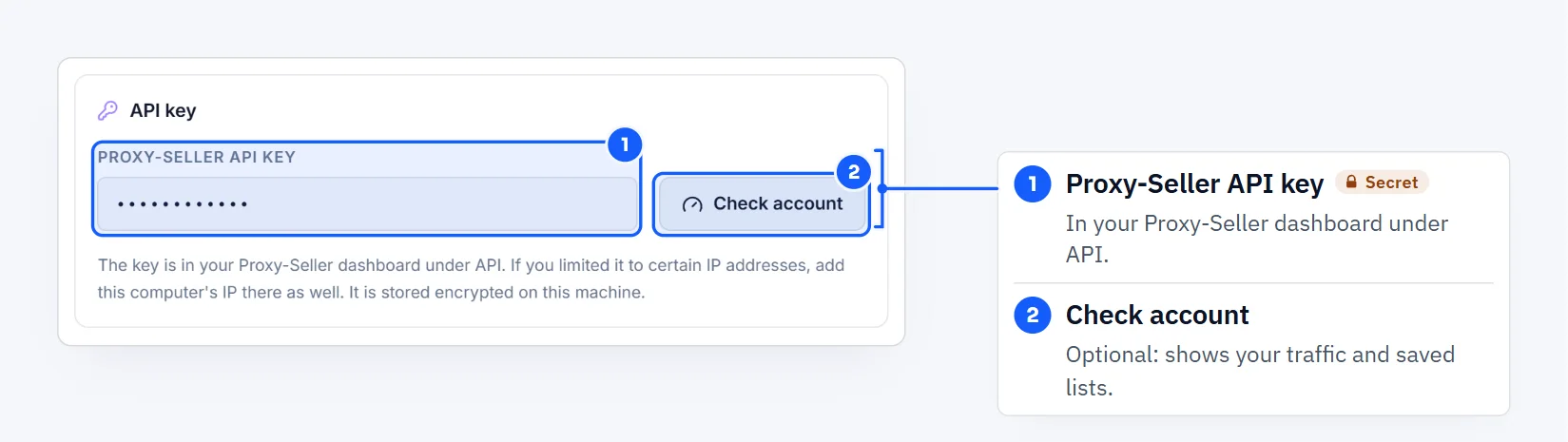

The API key part of the Proxy-Seller connector, with placeholder values.Kích thước đầy đủKích thước đầy đủ - Proxy-Seller API keyIn your Proxy-Seller dashboard under API.
- Check accountOptional: shows your traffic and saved lists.
Choose the product and the list, then pull
Pick the product: Residential, or one sold per IP (IPv6, IPv4, ISP, Mobile, IPv4 Mix or ISP Mix). For Residential, choose New list, which creates a list named SoftGlaze on your account, or Existing list to download one you saved. Set the country, how many ports (1 to 1000, each its own exit IP) and, if you want, a region and city: select Load regions and cities and pick them, as the names are case sensitive. Choose the IP rotation (Sticky, Every request or On a timer), HTTP or SOCKS5 and the Entry server nearest to you (Europe, United States or Asia), then select Create list and add proxies. Save credentials keeps the key, encrypted, on this computer. For a product sold per IP, pick All orders or one order instead and select Add proxies: the pull adds every active IP in it.


The What to pull part of the Proxy-Seller connector, before a pull, with placeholder values.Kích thước đầy đủKích thước đầy đủ - ProductResidential, or IPv6, IPv4, ISP, Mobile, IPv4 Mix or ISP Mix, sold per IP.
- New list or Existing listCreate a list now, or pull one you saved.
- CountryAny / Random, or one country.
- How manyPorts in the new list, 1 to 1000. Each port is its own exit IP.
- RegionOptional. Pick it from the loaded list: names are case sensitive.
- CityOptional. Pick it from the loaded list too.
- Load all countriesFills the country list from your account.
- Load regions and citiesFills Region and City for that country.
- IP rotationSticky, Every request, or On a timer.
- ProtocolHTTP or SOCKS5.
- Entry serverEurope, United States or Asia: the server the proxies connect through.
- Save credentialsKeeps them, encrypted, on this computer.
- Create list and add 10 proxiesCreates a list named SoftGlaze on your account and adds its ports.
Check what was added
Returned, Added and Existing show what the pull did, and the new proxies are listed under Added in the last pull: one line per port, all with the list's login. In the pool each is named after the product, the place, the rotation and the port. They are in your Proxy pool, ready to check and to assign to profiles.


Trình kết nối
SoftGlaze Browser làm gì với Proxy-Seller
For residential traffic, the app asks Proxy-Seller's API to make a list with the location, rotation and number of ports you choose (each port is its own exit IP) and downloads it, or downloads a list you already made in the dashboard.
For the products sold per IP (IPv4, IPv6, ISP, mobile and the mixes), it imports the proxies from the orders already on your account.
- Cách ứng dụng thêm proxy
- Qua API của nhà cung cấp
- Tối đa mỗi lần lấy
- 1,000. A new residential list holds up to 1000 ports, the most Proxy-Seller allows in one list. From per-IP orders, a pull adds every active IP, up to 5000
- Giao thức
- HTTP, SOCKS5
- Xoay vòng
- A residential list can give each port a new exit IP on every request, or on a timer of 60 to 3600 seconds; the app sets this when it creates the list. Mobile proxies keep their reboot link, so Rotate IP in the proxy pool gives them a new IP.
- Phiên cố định
- Sticky lists keep each port's exit IP for as long as the device behind it stays online; Proxy-Seller's docs give no fixed time. IPv4, IPv6 and ISP proxies are static: each is one fixed IP for the rental period.
- Vị trí địa lý
- Residential: any country, or one country with an optional region and city, picked from Proxy-Seller's location list. Proxy-Seller also offers ISP targeting, which this connector does not. IPv4, IPv6, ISP and mobile: the country you chose when you bought the order.
- API
- proxy-seller.com/personal/api/v2
| Trường trong ứng dụng | Nhập gì | Tìm ở đâu |
|---|---|---|
| Proxy-Seller API keyBí mật | Your API key. Check account then shows the traffic left, your saved residential lists and your orders. | Proxy-Seller dashboard: API. If you limited the key to certain IP addresses, add this computer's IP there too. |
| Product | Residential, IPv6, IPv4, ISP, Mobile, IPv4 Mix or ISP Mix. After Check account, each one shows how many active IPs you have. | The product you bought. |
| OrderKhông bắt buộc | For IPv4, IPv6, ISP, Mobile and the mixes: All orders, or one order. Each IP gets its own port, and IPs already in your pool are skipped. | Your orders, listed after Check account. |
| New list or Existing list | Residential only. New list creates a list on your Proxy-Seller account and downloads it; Existing list downloads one of your saved lists. | Your choice. |
| Saved listKhông bắt buộc | For Existing list: one of your residential lists. Check account loads them. | Lists you made in the dashboard or in earlier pulls. |
| CountryKhông bắt buộc | Any / Random, or one country. Load all countries reads Proxy-Seller's own location list. | Your choice. |
| How many | 1 to 1000 ports in the new list. The default is 5. Each port is its own exit IP. | Your choice. |
| Region and CityKhông bắt buộc | Optional. Pick them after Load regions and cities: Proxy-Seller's names are case sensitive. | Your choice. |
| IP rotation | Sticky (each port keeps its IP while the device stays online), Every request, or On a timer (every 60, 300, 600, 1800 or 3600 seconds). | Your choice. It is saved with the new list. |
| Protocol | HTTP or SOCKS5. Residential ports take both; an IPv4, IPv6, ISP or mobile order may have only an HTTP(S) port. | Your choice. |
| Entry server | Residential only: Europe (res.proxy-seller.com, the default), United States (us.res.proxy-seller.com) or Asia (asia.res.proxy-seller.com). The app asks for that server when it creates or downloads the list. | Your choice: the one nearest to this computer. |
The app sends the API key to Proxy-Seller's API (proxy-seller.com/personal/api/v2) to read your account, list your orders and lists, create residential lists and download them. The key is saved encrypted on your computer and never sent to SoftGlaze.
Thử nghiệm của chúng tôi, 15 tháng 10, 2026. Proxy-Seller gave SoftGlaze trial traffic to test the connector: 10 GB of residential traffic and 200 US IPv6 proxies. By 15 October 2026 the app had pulled both through Proxy-Seller's API, and the proxies passed the app's connection check. That test used API v1. On 2 November 2026 the API v2 connector read the 200 IPv6 proxies (all active, HTTP(S) only, with no SOCKS5 port). The residential trial had ended by then, so we have not yet tested a residential pull on API v2.
Sản phẩm
Loại proxy và tính năng
Đánh dấu "Trong ứng dụng": các loại mà trình kết nối Proxy-Seller có thể thêm vào kho của bạn.
Residential
Trong ứng dụngIPs of home devices, billed per GB. Rotating or sticky, with country, region, city and ISP targeting.
IPv4
Trong ứng dụngDedicated datacenter IPs, rented per IP for a period, with no traffic limit.
IPv6
Trong ứng dụngDedicated IPv6 IPs, rented per IP. They reach only websites that support IPv6.
ISP
Trong ứng dụngStatic IPs registered to internet providers, rented per IP, with country targeting.
Mobile
Trong ứng dụng4G, 5G and LTE carrier IPs, rented per IP, that change IP by link or every 5 or 30 minutes.
IPv4 Mix and ISP Mix
Trong ứng dụngPackages of IPv4 or ISP addresses that Proxy-Seller's API lists as their own types (mix and mix_isp).
- A residential list holds up to 1000 ports, and each port is its own exit IP. For more, create more lists.
- Rotation is set per list: sticky, on every request, or every 1 to 3600 seconds.
- Residential HTTP and SOCKS5 use the same host, ports, login and password.
- Residential targeting by country, region, city and ISP, in 220+ locations by Proxy-Seller's page.
- Three residential gateways: Europe (res.proxy-seller.com, the default), USA and Asia. The exit location comes from the list.
- Login and password, or a list of allowed IPs, on every proxy type.
- A User API (v2) for orders, lists and exports, with the key in the address; errors come back with HTTP status 200.
- Proxy-Seller's own SDK notes give the API limit as 1000 requests a minute per key.
- Mobile proxies change IP by link, or every 5 or 30 minutes.
Bảng giá
Giá của Proxy-Seller
Bạn trả tiền trực tiếp cho Proxy-Seller. SoftGlaze không bán proxy và không cộng thêm gì vào các mức giá này. Giá có thể thay đổi, vì vậy hãy kiểm tra trang của Proxy-Seller trước khi mua.
| Sản phẩm | Giá | Đơn vị | Gói hoặc mức tối thiểu | Ghi chú |
|---|---|---|---|---|
| Residential, 1 GB | $3.5 / GB | per GB | 1 GB | Valid for 30 days. |
| Residential, 3 GB | $3 / GB | per GB | 3 GB | |
| Residential, 10 GB | $2.7 / GB | per GB | 10 GB | |
| Residential, 25 GB | $2.6 / GB | per GB | 25 GB | |
| Residential, 50 GB | $2.5 / GB | per GB | 50 GB | |
| Residential, 100 GB | $2.2 / GB | per GB | 100 GB | |
| Residential, 200 GB | $2.1 / GB | per GB | 200 GB | |
| Residential, 300 GB | $2 / GB | per GB | 300 GB | |
| Residential, 500 GB | $1.7 / GB | per GB | 500 GB | |
| Residential, 750 GB | $1.5 / GB | per GB | 750 GB | |
| Residential, 1000 GB | $1.45 / GB | per GB | 1000 GB | Larger volumes: enterprise prices on request. |
| Residential, 3-day trial | $1.99 | once | Offered on Proxy-Seller's Chinese residential page; the English pages do not show it or the traffic it includes. Not refundable, by the return policy. | |
| IPv4 | from $0.49 / IP | per IP | Proxy-Seller's price page title says from $0.58 / IP. The price depends on country, period and quantity. | |
| IPv6 | from $0.02 / IP | per IP | The price depends on country, period and quantity. | |
| ISP | from $0.98 / IP | per IP | The price depends on country, period and quantity. | |
| Mobile | from $10 / IP | per IP | The price depends on country, carrier, period and access type. |
Residential traffic comes in packages valid for 30 days, with no subscription; the price per GB falls as the package grows. The price page lists the price per GB for each volume, not the total. IPv4, IPv6, ISP and mobile proxies are rented per IP for a period; their exact price is shown only in the order calculator, so only Proxy-Seller's "from" prices are listed here. Payment by card, PayPal or crypto. Prices are in US dollars.
Độ tin cậy
Ưu và nhược điểm của Proxy-Seller
Thông tin từ các trang và điều khoản của chính Proxy-Seller, cùng thông tin về trình kết nối từ mã của ứng dụng. Không có điểm đánh giá.
Ưu điểm
- Residential, IPv4, IPv6, ISP, mobile and mix proxies all come in through one connector and one API key.
- One pull can create a residential list of up to 1000 ports, each its own exit IP, sticky or rotating.
- Residential lists take HTTP and SOCKS5 on the same ports.
- Residential packages start at 1 GB, with no subscription.
- Mobile orders keep their reboot link, so Rotate IP in the proxy pool gives them a new IP.
- Support around the clock by live chat, Telegram, Slack, Discord or email.
Nhược điểm
- Residential traffic is valid for 30 days from purchase.
- No free trial on the English pages. Refunds or replacements only within 24 hours when a proxy does not work as stated, and none for the residential 3-day trial.
- The acceptable use policy forbids using the proxies with banks, payment systems, email providers, cloud storage, collaboration tools, government and education sites.
- IPv6 proxies cannot reach websites that only have an IPv4 address.
- Each New list pull creates a list on your Proxy-Seller account, and it stays there until you delete it in the dashboard.
- Proxy-Seller's pages disagree on some points: IPv4 from $0.49 or $0.58 per IP, and whether a residential trial exists.
Mức phù hợp
Khi nào Proxy-Seller là lựa chọn phù hợp
Phù hợp khi
- You already rent IPv4, IPv6, ISP or mobile proxies from Proxy-Seller and want them in your profiles without copying them by hand.
- You want residential and static IPs from one account and one key.
- You want many sticky residential IPs in one place: up to 1000 ports per list, by country, region or city.
Kém phù hợp khi
- You buy residential traffic now and then: each package is valid for 30 days.
- Your profiles sign in to email, banking or payment sites: Proxy-Seller's acceptable use policy forbids them.
- You want to test for free first: the English pages offer no free trial, only a 24-hour refund window for proxies that do not work.
Câu hỏi thường gặp
Câu hỏi về Proxy-Seller trong SoftGlaze Browser
Where do I find the API key?
In your Proxy-Seller dashboard, under API. Generate one there if you have none. If you limited the key to certain IP addresses, add the IP of the computer that runs SoftGlaze Browser, or Proxy-Seller refuses the calls.
What does a residential pull change on my Proxy-Seller account?
New list creates a list on your account, named SoftGlaze plus the place and the time, with up to 1000 ports, and downloads it. Each port is its own exit IP. Existing list only downloads a list you made before, and adds the ports your pool does not have yet.
Why does a page not load through my IPv6 proxy?
IPv6 proxies reach only websites that have an IPv6 address. Check that the sites you use support IPv6, or use IPv4, ISP or residential proxies for them.
Why does a SOCKS5 pull fail for my order?
An IPv4, IPv6, ISP or mobile order may have only an HTTP(S) port. The app then says the order has no SOCKS5 port; pull it as HTTP instead. Residential lists take both protocols on the same ports.
Can I use these proxies for email or bank accounts?
No. Proxy-Seller's acceptable use policy forbids using its proxies with email providers, banks, payment systems, cloud storage, government and education sites, among others.
 Ưu đãi đối tácĐã tin tưởng chúng tôi hai lần: Nhà cung cấp này đã cho chúng tôi quyền truy cập thử nghiệm hơn một lần, nên chúng tôi có thể tiếp tục thử nghiệm trình kết nối.Tích hợp
Proxy-Solutions
SoftGlaze Browser imports the proxies on your Proxy-Solutions account with the Integration token made for anti-detect browsers.
- Dân cư
- ISP / tĩnh
- Di động
- Trung tâm dữ liệu
từ$1.05 / month
Đã thử nghiệm Tích hợp
Proxy302
SoftGlaze Browser signs in to Proxy302's Open API with your API key and creates each proxy it adds there, on the Premium or the Standard line, from the traffic you bought for that line.
- Dân cư
từ$1.50 / GB
Chưa thử nghiệm- Tích hợp
ProxyEmpire
SoftGlaze Browser uses a ProxyEmpire API token to generate ready proxy lines for your Rotating Residential, Rotating Mobile, Rotating Datacenter or Static Residential package, with the location and session you pick.
- Dân cư
- ISP / tĩnh
- Di động
- Trung tâm dữ liệu
từ$3.50 / GB
Chưa thử nghiệm