


Hubungkan MarsProxies
SoftGlaze Browser uses a MarsProxies API token to generate a residential proxy list for your sub-user, each proxy sticky for the time you pick (24 hours by default), or one rotating proxy.
Listing penyedia, panduan penyiapan, dan harga tersedia dalam bahasa Inggris.
Works with SoftGlaze Browser. SoftGlaze has no partnership with MarsProxies and sells none of its proxies: you buy them from MarsProxies and connect your own account.

Langkah demi langkah
Cara menghubungkan MarsProxies
What you need: MarsProxies residential traffic (buying at least 1 GB opens the API), the API token, and a residential sub-user's username with its password.
Get the API token and a sub-user login
Buy at least 1 GB of MarsProxies residential traffic: that opens the API. In the MarsProxies dashboard, open Settings, then API, and generate a token. Then open Residential, then Dashboard. Each line of the proxy list is host:port:username:password; copy the username and the base password, the part before the first underscore.
Open MarsProxies in Proxy providers
In SoftGlaze Browser, open Proxy providers in the sidebar, search for MarsProxies and select it. The Pull proxies tab holds the connector form.
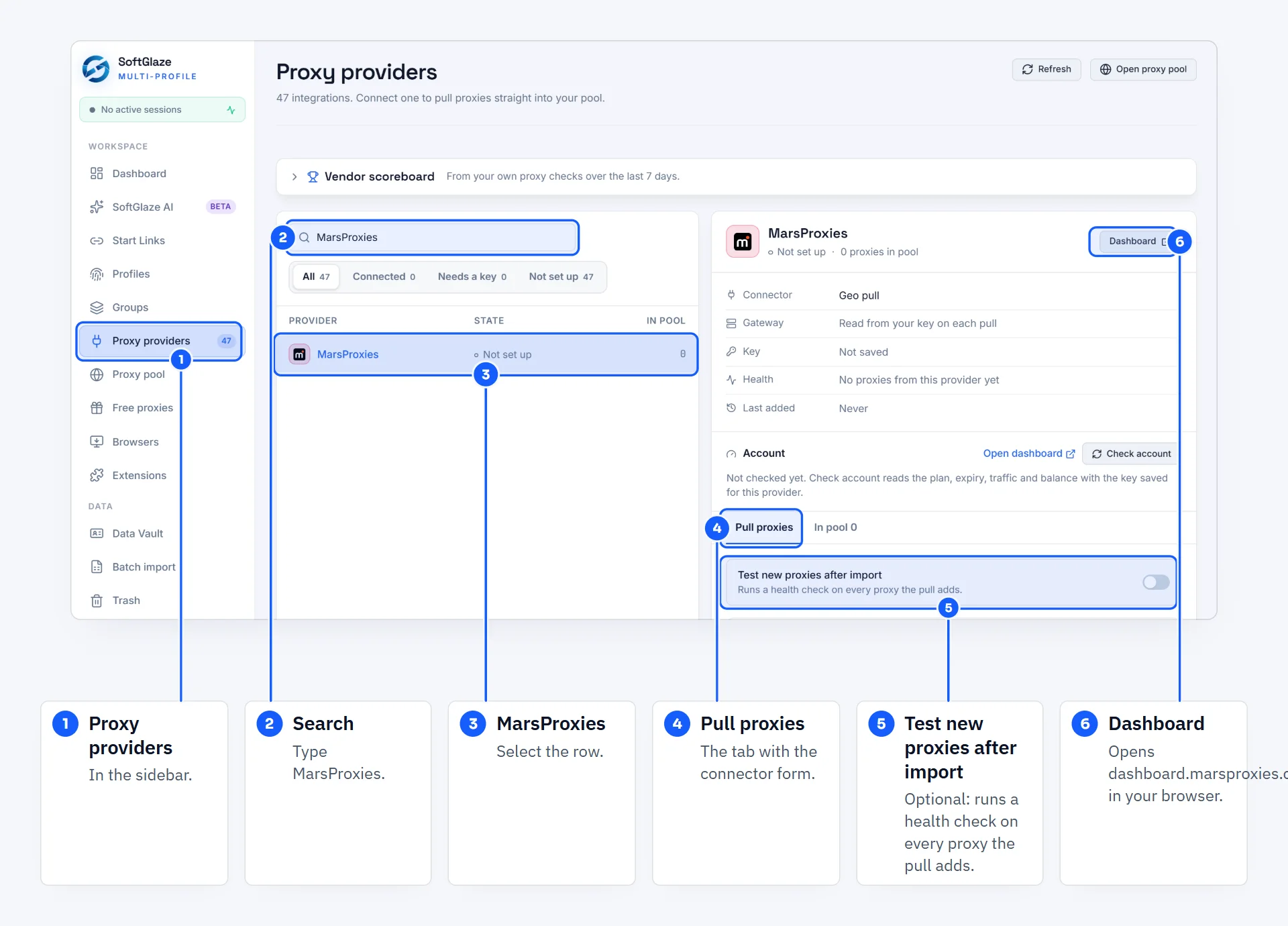
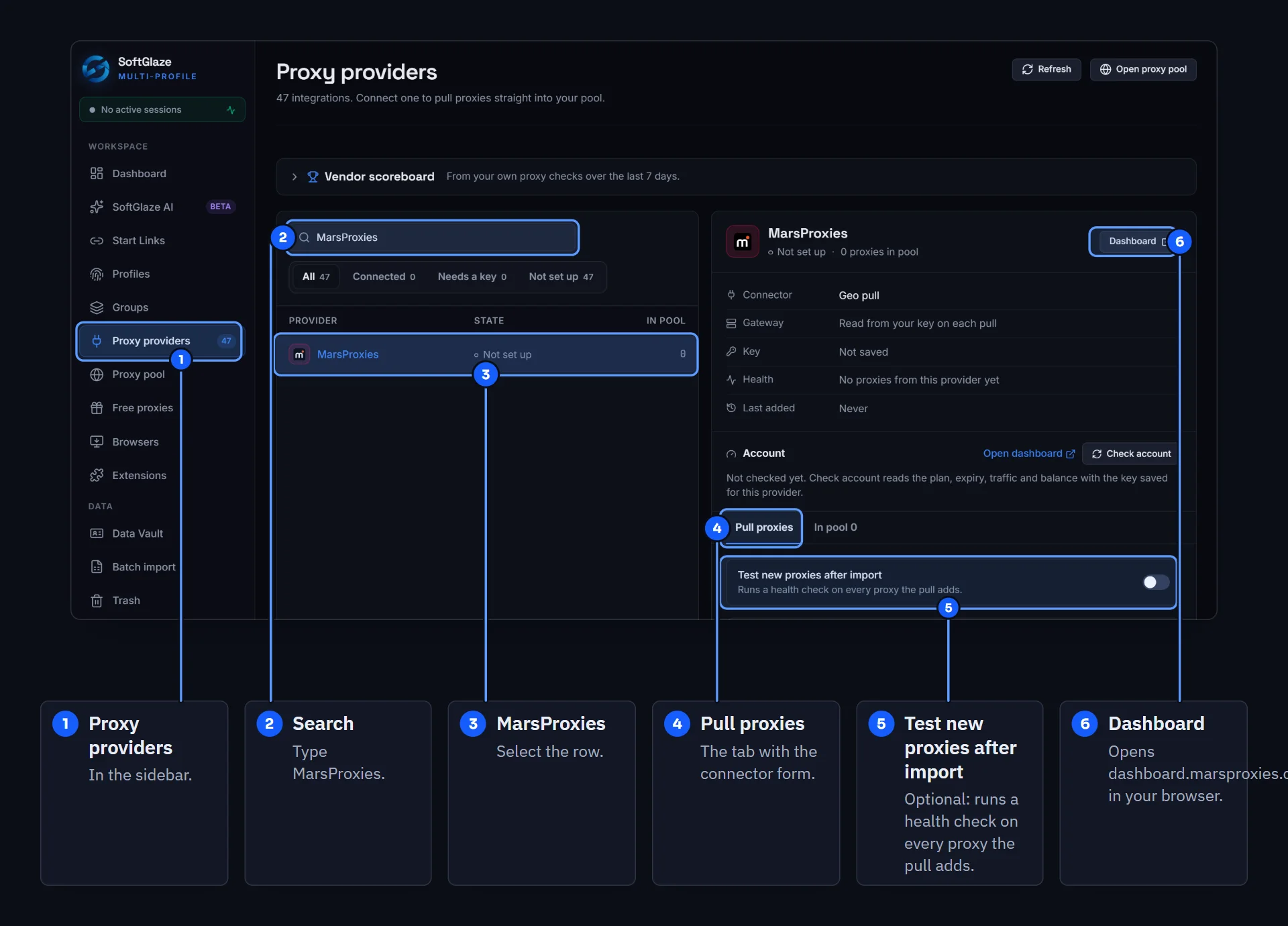
Proxy providers in SoftGlaze Browser.Ukuran penuhUkuran penuh - Proxy providersIn the sidebar.
- SearchType MarsProxies.
- MarsProxiesSelect the row.
- Pull proxiesThe tab with the connector form.
- Test new proxies after importOptional: runs a health check on every proxy the pull adds.
- DashboardOpens dashboard.marsproxies.com in your browser.
Enter the sub-user and the API token
Type the sub-user's username, as in the dashboard's proxy list. In Sub-user password, enter the base password only, the part before the first underscore: the app adds the country and the session itself. Paste the API token from Settings, then API. Save credentials keeps them, encrypted, on this computer for the next pull.
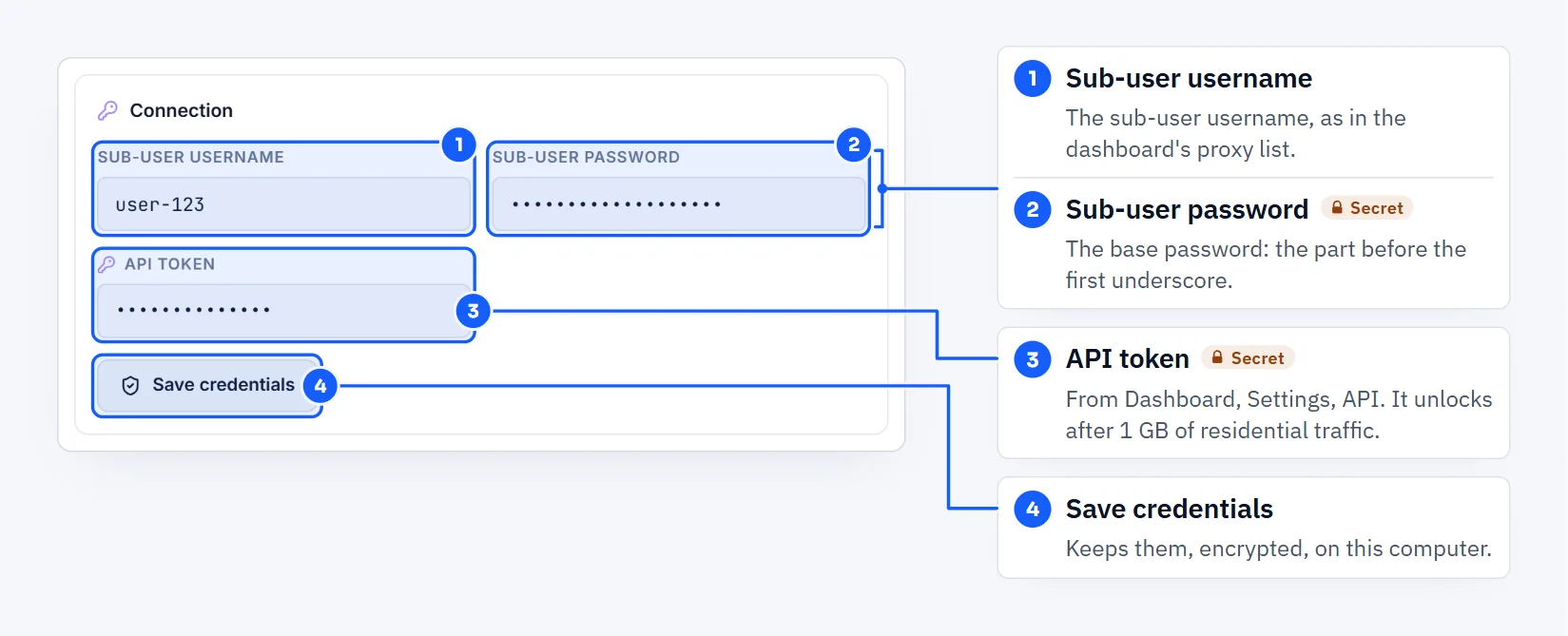
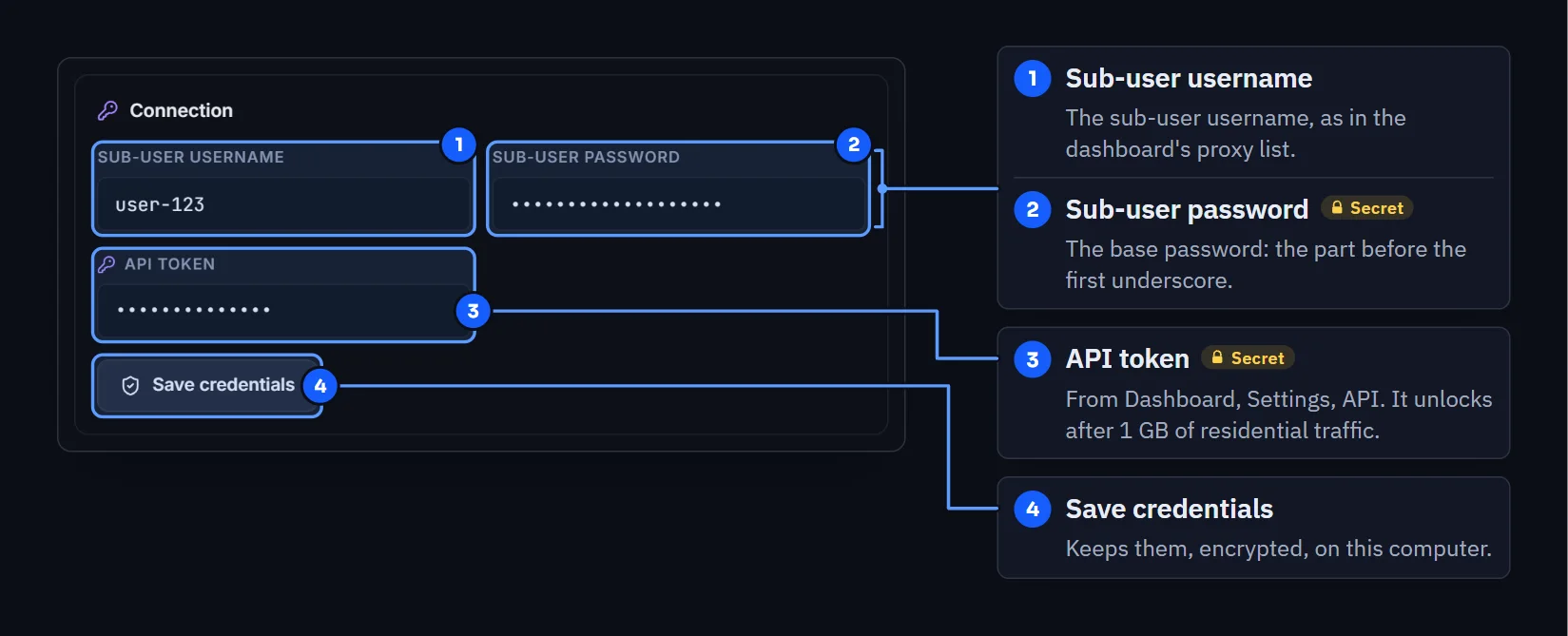
The Connection part of the MarsProxies connector, with placeholder values.Ukuran penuhUkuran penuh - Sub-user usernameThe sub-user username, as in the dashboard's proxy list.
- Sub-user passwordThe base password: the part before the first underscore.
- API tokenFrom Dashboard, Settings, API. It unlocks after 1 GB of residential traffic.
- Save credentialsKeeps them, encrypted, on this computer.
Choose where and how many, then pull
Pick Any / Random or one country. State and City are optional: MarsProxies documents states for the United States only, such as Texas, and the app writes the city in lower case without spaces. Choose how many (1 to 1000), HTTP or SOCKS5 and Keep same IP, up to 7 days (24 hours if blank), then select Pull proxies. How many 1 with Keep same IP blank gives one rotating proxy instead.
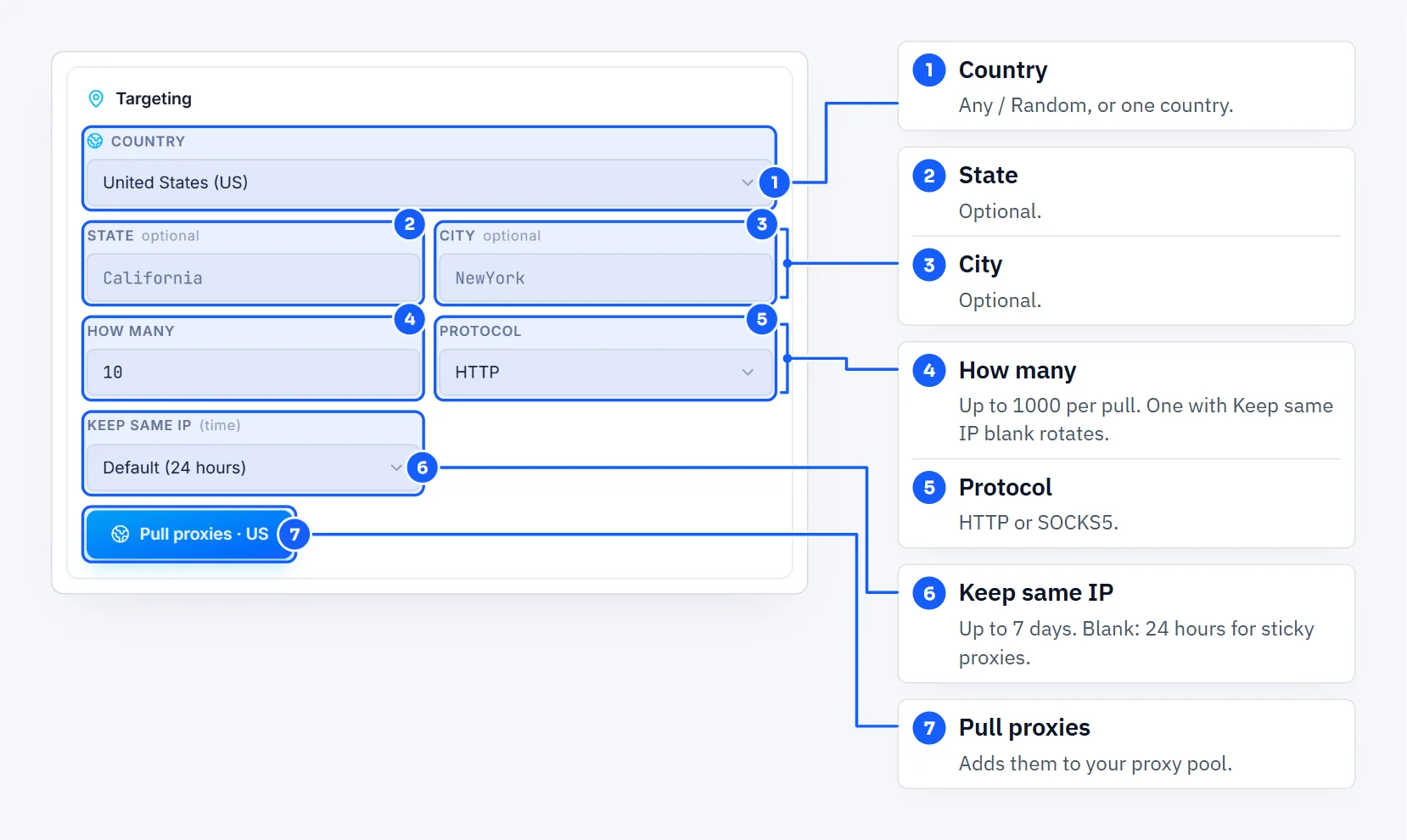
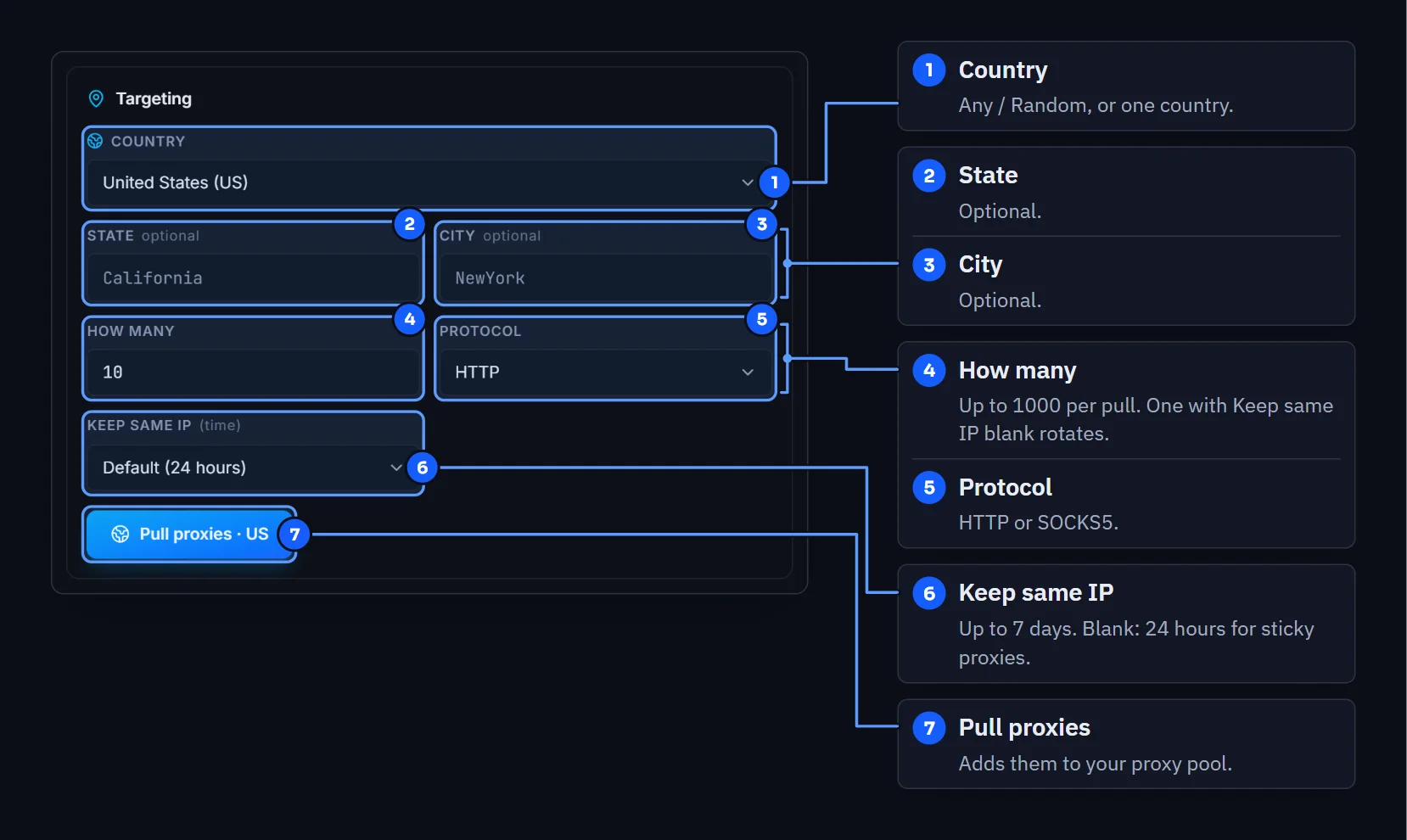
The Targeting part of the MarsProxies connector, before a pull, with placeholder values.Ukuran penuhUkuran penuh - CountryAny / Random, or one country.
- StateOptional.
- CityOptional.
- How manyUp to 1000 per pull. One with Keep same IP blank rotates.
- ProtocolHTTP or SOCKS5.
- Keep same IPUp to 7 days. Blank: 24 hours for sticky proxies.
- Pull proxiesAdds them to your proxy pool.
Check what was added
The new proxies are listed under Added in the last pull: the protocol, the sub-user's username, a hidden password and ultra.marsproxies.com with its port. The lines look alike because MarsProxies puts the country and each proxy's session in the password. They are in your Proxy pool, ready to check and to assign to profiles.


Belum diuji. Kami belum mencoba konektor ini dengan akun MarsProxies aktif: konektor mengikuti dokumentasi MarsProxies. Jika penarikan gagal, beri tahu kami.
Konektor
Apa yang dilakukan SoftGlaze Browser dengan MarsProxies
The app calls MarsProxies' residential API with your token, your sub-user's username and its base password, and adds the proxy lines it returns, with the country you pick (and an optional US state or a city) and HTTP or SOCKS5.
How many 1 with Keep same IP blank gives one rotating proxy, a new IP on every request. More proxies, or a Keep same IP time, are sticky, held for that time (5 minutes to 7 days) or MarsProxies' default of 24 hours. Only residential is connected; MarsProxies documents no API for its other products.
- Cara aplikasi menambahkan proxy
- Lewat API penyedia
- Maksimum per penarikan
- 1,000. MarsProxies' API has its own maximum per list, which it does not publish; each pull asks for new sessions
- Protokol
- HTTP, SOCKS5
- Rotasi
- How many 1 with Keep same IP blank adds one rotating proxy: MarsProxies gives it a new IP on every request. More proxies, or a Keep same IP time, are sticky.
- Sesi sticky
- Each sticky proxy gets its own session for the Keep same IP time, 5 minutes to 7 days, or MarsProxies' default of 24 hours when it is blank. MarsProxies allows 1 second to 7 days, and its guide says an IP can change earlier when the device behind it leaves the network.
- Lokasi
- Any country or one country, with an optional US state and city, written into the password. MarsProxies also documents regions and several countries at once, which this connector does not offer.
- API
- api.marsproxies.com/v1/residential
| Kolom di aplikasi | Yang diisi | Tempat menemukannya |
|---|---|---|
| Sub-user username | The residential proxy username, and only the username. | MarsProxies dashboard: Residential, then Dashboard; each line of the proxy list is host:port:username:password. The pull checks this sub-user's own traffic left. |
| Sub-user passwordRahasia | The base password only: the part before the first underscore. The app adds the country and the session itself. | The same proxy list line. The dashboard's Reset password button changes it for every session. |
| API tokenRahasia | Your MarsProxies API token. | MarsProxies dashboard: Settings, then API. It is there after you buy at least 1 GB of residential traffic. |
| CountryOpsional | Any / Random, or one country. | Your choice. |
| StateOpsional | A US state by its full name, such as Texas. MarsProxies documents state targeting for the United States only. | Your choice. Set the country to United States. |
| CityOpsional | A city name, such as Dallas. The app writes it in lower case without spaces. | Your choice. Set the country too. |
| How many | 1 to 1000. The form starts at 5. One with Keep same IP blank is a rotating proxy; more are sticky, each its own session. | Your choice. |
| Protocol | HTTP or SOCKS5. | Your choice. |
| Keep same IPOpsional | Default (24 hours), or 5 minutes to 7 days. With it blank, How many 1 gives one rotating proxy. | Your choice. |
The app sends the API token to MarsProxies' API (api.marsproxies.com) to read the traffic left and to generate the proxy list, together with the sub-user's username and password. They are saved encrypted on your computer and never sent to SoftGlaze.
Produk
Jenis proxy dan fitur
Bertanda "Di aplikasi": jenis yang bisa ditambahkan konektor MarsProxies ke kumpulan Anda.
Residential Proxies
Di aplikasiIPs from real household devices, billed per GB; the traffic never expires.
ISP Proxies
Static, dedicated residential IPs, billed per IP for 1, 30 or 90 days.
Datacenter Proxies
Dedicated datacenter IPs, billed per IP for 1, 30 or 90 days, in 34+ countries.
Mobile Proxies
Dedicated 5G, 4G, 3G and LTE IPs, billed per proxy for 1, 30, 60 or 90 days, with unlimited data.
- Residential traffic never expires: it rolls over until you use it.
- HTTP, HTTPS and SOCKS5.
- Rotating, with a new IP on every request, or sticky sessions from 1 second to 7 days.
- Targeting by region, country (several at once), US state and city, written into the password.
- Login by username and password, or by whitelisted IP.
- A residential API for proxy lists, traffic and sub-users. It opens after you buy at least 1 GB of residential traffic.
- Sub-users draw their traffic from the main account balance.
- No thread limits on residential, by MarsProxies' own summary.
- Support around the clock by live chat, email and Discord.
Harga
Harga MarsProxies
Anda membayar langsung ke MarsProxies. SoftGlaze tidak menjual proxy dan tidak menambahkan apa pun ke harga ini. Harga bisa berubah, jadi cek halaman MarsProxies sebelum membeli.
| Produk | Harga | Satuan | Paket atau minimum | Catatan |
|---|---|---|---|---|
| Residential, 1 GB | $4.99 / GB | per GB | 1 GB | The smallest plan; MarsProxies suggests it for testing. |
| Residential, 5 GB | $4.39 / GB | per GB | 5 GB | 12% off. The page shows a price of $21.96 for this plan. |
| Residential, 10 GB | $3.99 / GB | per GB | 10 GB | 20% off. |
| Residential, 20 GB | $3.74 / GB | per GB | 20 GB | 25% off. |
| Residential, 50 GB | $3.19 / GB | per GB | 50 GB | 36% off. |
| Residential, 100 GB | $2.99 / GB | per GB | 100 GB | 40% off. |
| Residential, 200 GB | $2.74 / GB | per GB | 200 GB | 45% off. |
| Residential, 500 GB | $2.30 / GB | per GB | 500 GB | 54% off. |
| Residential, 1000 GB | $2.10 / GB | per GB | 1000 GB | 58% off. |
| Residential, 2500 GB | $1.95 / GB | per GB | 2500 GB | 61% off. |
| Residential, 5000 GB | $1.85 / GB | per GB | 5000 GB | 63% off. |
| Residential, 10000 GB | $1.65 / GB | per GB | 10000 GB | 67% off. |
| ISP, 1 day | $1.39 / IP | per IP for 1 day | 1 IP | $1.36 from 100 IPs, $1.35 from 500 IPs. Not in the app. |
| ISP, 30 days | $2.99 / IP | per IP for 30 days | 1 IP | Down to $2.09 per IP at 1,000 IPs. 90 days: $8.07 per IP for 1 IP. Not in the app. |
| Datacenter, 1 day | $0.99 / IP | per IP for 1 day | 1 IP | The same at every quantity. Not in the app. |
| Datacenter, 30 days | $1.99 / IP | per IP for 30 days | 1 IP | Down to $1.19 per IP at 1,000 IPs. Not in the app. |
| Mobile, 1 day | $8.49 | per proxy for 1 day | 1 proxy | Unlimited data. Not in the app. |
| Mobile, 30 days | $95.00 | per proxy for 30 days | 1 proxy | 5% off. 60 days: $179.10. 90 days: $255.00. Not in the app. |
Residential is pay as you go: the traffic never expires and new top-ups add to the balance. The residential page gives two figures for its largest volume discount, up to 54% and up to 67%; its price table goes to 67%. The ISP, datacenter and mobile tables are from MarsProxies' own product summary (llms-full.txt); MarsProxies says ISP prices can vary by country, with a small fee for state or city targeting. Prices are shown in dollars, without VAT, which is added where it applies.
Kepercayaan
Kelebihan dan kekurangan MarsProxies
Fakta dari halaman dan ketentuan MarsProxies sendiri, serta fakta tentang konektor dari kode aplikasi. Tanpa rating.
Kelebihan
- Residential traffic never expires, and there is no monthly plan.
- Sticky sessions from 1 second to 7 days, or a new IP on every request.
- HTTP and SOCKS5 on residential, and the connector offers both.
- Country, state and city targeting on residential at no extra cost.
- A small start: 1 GB for $4.99, and $1.65 / GB at 10,000 GB.
- The connector reads the sub-user's traffic left before each pull and stops with a message when there is none.
Kekurangan
- No free trial and no refund on residential traffic; MarsProxies suggests buying 1 GB to test.
- Its terms make fees non-refundable, except a fault in the first 24 hours that MarsProxies cannot fix, and never for payments in crypto.
- The API, and so the connector, works only after you buy at least 1 GB of residential traffic.
- MarsProxies documents an API for residential only, so the app cannot pull its ISP, datacenter or mobile proxies.
- MarsProxies' guide says a sticky IP is not promised for the whole session, because devices join and leave the network.
- Its acceptable use policy forbids fake social media profiles and getting around a site's access controls, rate limits or robots.txt.
- Some websites are blocked for new residential clients; the list is linked from the acceptable use policy, and some open after ID verification.
Kecocokan
Kapan MarsProxies menjadi pilihan yang baik
Cocok jika
- You buy residential traffic now and then and want to keep what you do not use: MarsProxies' traffic never expires.
- Your profiles should keep one IP for up to 7 days, or rotate on every request, over HTTP or SOCKS5.
- You need a US state or a city, at no extra cost.
Kurang cocok jika
- You want to try before you pay: there is no free trial and no refund on residential traffic.
- You want to pull ISP, datacenter or mobile proxies into the app: only residential has an API.
- You plan to run social media profiles that are not real people: MarsProxies' acceptable use policy forbids fake profiles.
Tanya jawab
Pertanyaan tentang MarsProxies di SoftGlaze Browser
Which login does the app need?
Three things: the API token (dashboard, Settings, then API) and a residential sub-user's username with its base password. In the dashboard's proxy list the password carries extra parts after an underscore, such as _country-us. Enter only the part before the first underscore: the app adds the country and the session itself.
Why is there no API token in my dashboard?
MarsProxies opens the API only after you buy at least 1 GB of residential traffic. If MarsProxies answers that the residential API is not enabled, the app shows that message and adds nothing.
Why do all my MarsProxies proxies look the same in the list?
MarsProxies puts the country and each proxy's session in the password, which the app hides. The host, port and username are the same for every proxy, but each password differs, so each proxy is its own session with its own IP.
How long does a MarsProxies proxy keep its IP?
For the Keep same IP time you pick, 5 minutes to 7 days, or MarsProxies' default of 24 hours when it is blank. MarsProxies' guide says the IP can change earlier when the device behind it leaves the network; the same login then gets a new IP. How many 1 with Keep same IP blank gives a rotating proxy instead, with a new IP on every request.
Can I target a state or a city?
Yes. Pick the country, then type a US state by its full name, such as Texas, or a city, such as Dallas. MarsProxies documents states for the United States only. The app writes names in lower case without spaces; MarsProxies' docs show no example of a name with two words.
- Integrasi
Massive
SoftGlaze Browser builds Massive proxies on its residential gateway from your proxy username and API token, with the country, state, city, ZIP code or ASN and a sticky session in the username.
- Residensial
- ISP / statis
mulai$80
Belum diuji - Integrasi
Node4
SoftGlaze Browser uses a read-only Node4 API key to have Node4 build residential and rotating datacenter logins with your targeting, or to import the dedicated and shared datacenter IPs on your plan.
- Residensial
- ISP / statis
- Pusat data
mulai$4.99 / month
Belum diuji  Integrasi
NodeMaven
SoftGlaze Browser builds NodeMaven logins on gate.nodemaven.com from your dashboard proxy login, residential or mobile, with the location and, for sticky logins, a session in each.
- Residensial
- Seluler
mulai$4.25 / GB
Belum diuji