

ربط Live Proxies
SoftGlaze Browser builds Live Proxies Enterprise (B2B) logins on b2b.liveproxies.io from the username and password in your dashboard, with the country and a session in each.
قوائم المزوّدين وأدلة الإعداد والأسعار باللغة الإنجليزية.
Works with SoftGlaze Browser. SoftGlaze has no partnership with Live Proxies and sells none of its proxies: you buy them from Live Proxies and connect your own account.

خطوة بخطوة
كيفية ربط Live Proxies
What you need: a Live Proxies Enterprise (B2B) plan, and the Username and Password under Proxy Information in its dashboard. Individual (B2C) plans come as a fixed proxy list instead; add those with Batch add in the Proxy pool.
Find the Proxy Information in Live Proxies
Sign in to the Live Proxies dashboard. On an Enterprise (B2B) plan, Proxy Information shows the Username, which starts with LV, and the Password. On an individual (B2C) plan you get a ready proxy list instead: copy it and paste it into Batch add in the Proxy pool.
Open Live Proxies in Proxy providers
In SoftGlaze Browser, open Proxy providers in the sidebar, search for Live Proxies and select it. The Dashboard button opens liveproxies.io in your browser.

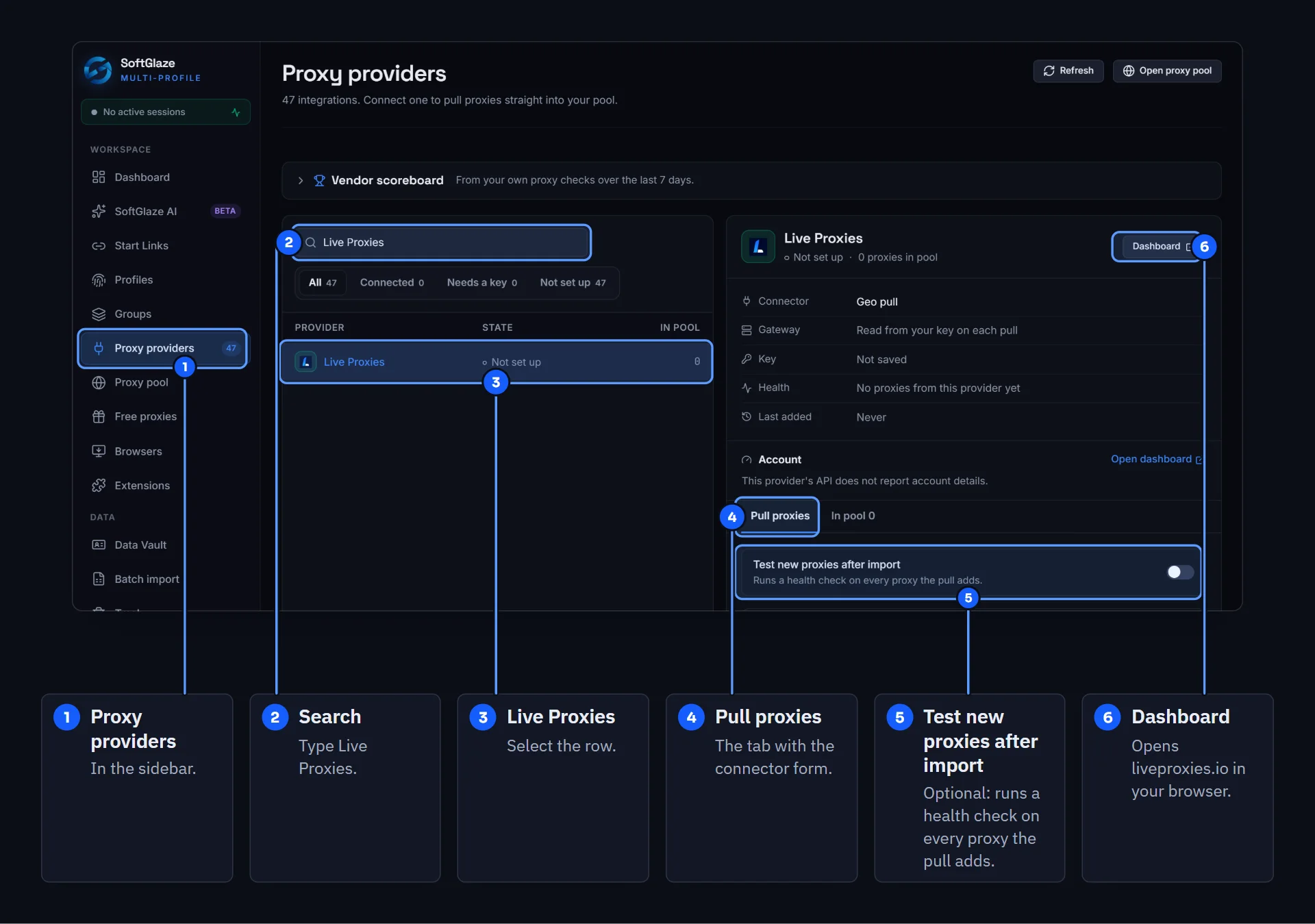
Proxy providers in SoftGlaze Browser.الحجم الكاملالحجم الكامل - Proxy providersIn the sidebar.
- SearchType Live Proxies.
- Live ProxiesSelect the row.
- Pull proxiesThe tab with the connector form.
- Test new proxies after importOptional: runs a health check on every proxy the pull adds.
- DashboardOpens liveproxies.io in your browser.
Enter the Proxy Information login
Type the Username from Proxy Information, which starts with LV, such as LV12345: the app keeps the LV part and adds the country and a session number itself. Type the Password from the same section. Save credentials keeps them, encrypted, on this computer for the next pull.


The Connection part of the Live Proxies connector, with placeholder values.الحجم الكاملالحجم الكامل - Proxy usernameThe Username under Proxy Information, for example LV12345.
- Proxy passwordThe Password under Proxy Information.
- Save credentialsKeeps them, encrypted, on this computer.
Choose the country and how many
Pick one country: every Live Proxies login carries one, so the list starts on United States and offers no Any / Random. How many 1 with no sticky session adds one rotating proxy; more adds that many sticky proxies, up to 1000. Choose HTTP or SOCKS5; Live Proxies offers SOCKS5 on Enterprise plans. Sticky session is optional, 1 to 8 digits: with How many 1 it is used as typed, and with more each proxy adds its number to it. Then select Pull proxies.
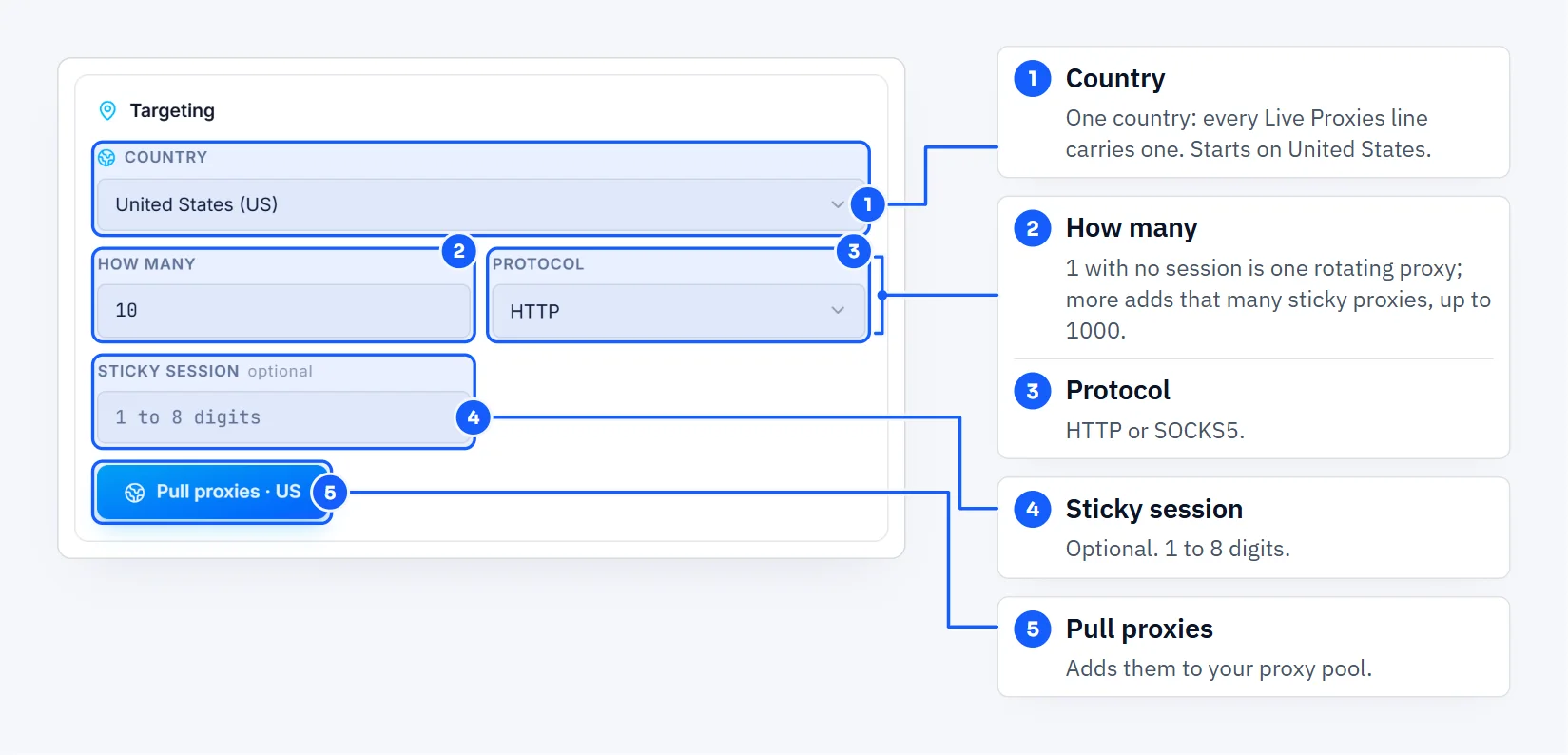

The Targeting part of the Live Proxies connector, with placeholder values.الحجم الكاملالحجم الكامل - CountryOne country: every Live Proxies line carries one. Starts on United States.
- How many1 with no session is one rotating proxy; more adds that many sticky proxies, up to 1000.
- ProtocolHTTP or SOCKS5.
- Sticky sessionOptional. 1 to 8 digits.
- Pull proxiesAdds them to your proxy pool.
Check what was added
The new proxies are listed under Added in the last pull: one login per proxy, with the country and its own session number in the username, on b2b-s1 to b2b-s17.liveproxies.io:7383 (socks.liveproxies.io:1080 for SOCKS5). They are in your Proxy pool, ready to check and to assign to profiles.
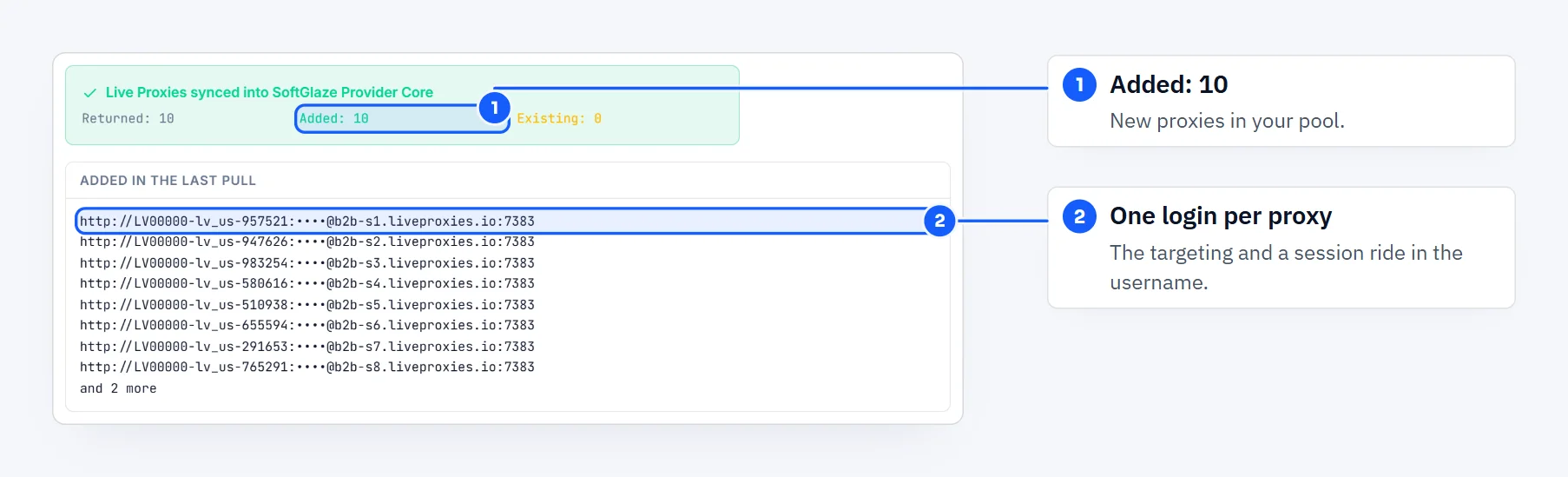

A pull of 10 proxies in the United States, with a placeholder login. Passwords are hidden.الحجم الكاملالحجم الكامل - Added: 10New proxies in your pool.
- One login per proxyThe targeting and a session ride in the username.


الموصّل
ما يفعله SoftGlaze Browser مع Live Proxies
Enter the Username and Password shown under Proxy Information in your Live Proxies Enterprise (B2B) dashboard and pick a country: every login carries one, so the list offers no Any / Random. One proxy without a session gives a rotating proxy; more than one gives that many sticky proxies, each with its own session, which Live Proxies keeps for up to 60 minutes (30 on mobile).
The app builds the logins on your computer, for b2b.liveproxies.io (HTTP) or socks.liveproxies.io (SOCKS5). Individual (B2C) plans come as a fixed proxy list instead: paste it into Batch add in the Proxy pool.
- كيف يضيف التطبيق البروكسيات
- بيانات دخول تُنشأ على بوابة المزوّد
- الحد الأقصى لكل سحب
- 1,000. The app writes the logins itself, so a pull makes no call to Live Proxies
- البروتوكولات
- HTTP, SOCKS5
- التدوير
- How many 1 with no sticky session adds one rotating login on b2b.liveproxies.io:7383. Live Proxies gives a rotating login a new IP on every request.
- الجلسات الثابتة
- Each sticky login carries its own session number; HTTP ones are spread over the servers b2b-s1 to b2b-s17. Live Proxies keeps a residential session for up to 60 minutes and a mobile one for 30. The app sets no time.
- المواقع
- One country per login, written into the username as lv_ and the country code. Live Proxies offers US state and city targeting on Enterprise plans; this connector does not.
- البوابة
- b2b.liveproxies.io:7383
| الحقل في التطبيق | ما تُدخله | أين تجده |
|---|---|---|
| Proxy username | The Username from Proxy Information, such as LV12345. The app keeps the LV part and adds the country and a session number itself. | Live Proxies dashboard: Proxy Information. |
| Proxy passwordسري | The Password from Proxy Information. | The same Proxy Information section. |
| Country | One country. Every Live Proxies login carries one, so the list offers no Any / Random; it starts on United States. | Your choice. Live Proxies lists 55 countries, strongest in the US, UK and Canada. |
| How many | 1 to 1000. The form starts at 5. How many 1 with no sticky session adds one rotating proxy; more adds that many sticky proxies. | Your choice. |
| Protocol | HTTP (b2b.liveproxies.io, port 7383) or SOCKS5 (socks.liveproxies.io, port 1080). | Your choice. Live Proxies offers SOCKS5 on Enterprise plans. |
| Sticky sessionاختياري | Optional, 1 to 8 digits. With How many 1 it is used as typed; with more, each proxy adds its number to it. Letters, or more than 8 digits, stop the pull with a message. Left empty, each proxy gets a random 6-digit session. | Your choice. |
Nothing is sent to Live Proxies when you pull: the app builds the logins on your computer. The password reaches Live Proxies' gateway only when a profile uses one of these proxies or the app checks one. It is saved encrypted on your computer and never sent to SoftGlaze.
اختبارنا الخاص، ٢ نوفمبر ٢٠٢٦. Live Proxies gave SoftGlaze trial traffic (100 GB, extended several times) on its B2B gateway to test the connector. On 1 and 2 November 2026 the app pulled 50 sticky HTTP proxies in the United States (47 passed the first health check) and 20 SOCKS5 proxies (all 20 passed). Five profiles opened ipinfo.io, Google and Wikipedia, and each browser's time zone matched its exit IP. A later check of 168 proxies passed 162; the 6 failures were timeouts and 503 or 504 errors, which Live Proxies put down to peers that were briefly unavailable. We have not tested the Mobile pool.
المنتجات
أنواع البروكسي والميزات
المحدد بـ "في التطبيق": الأنواع التي يمكن لموصّل Live Proxies إضافتها إلى مجمّعك.
Rotating residential
في التطبيقIPs from real home devices. Individual plans give a set of private IPs; Enterprise plans use a shared pool of 10M+ IPs, billed per GB.
Rotating mobile
في التطبيقMobile carrier IPs, with sticky sessions of 30 minutes, on individual and Enterprise plans. The connector builds residential logins only.
Static residential
Residential IPs that stay for 30 days or longer, US only and individual plans only. The pricing page lists it as Permanently Unavailable.
- Enterprise gateway: b2b.liveproxies.io on port 7383 for HTTP, socks.liveproxies.io on port 1080 for SOCKS5.
- Sticky residential sessions of up to 60 minutes; after that the IP changes, or you can rotate it earlier.
- Rotating mobile keeps a sticky session for 30 minutes.
- Enterprise plans: over 10 million IPs in 55 countries, targeting by ZIP code, city or ISP, and up to 6 whitelisted source IPs.
- City and state targeting is for the United States only, set in the dashboard.
- No limit on concurrent connections.
- Individual plans: private IPs, up to 500 per plan, and unmetered options.
- An API for account, usage and IP rotation; individual plans have limited API access.
الأسعار
أسعار Live Proxies
تدفع إلى Live Proxies مباشرة. لا تبيع SoftGlaze أي بروكسيات ولا تضيف شيئا إلى هذه الأسعار. الأسعار تتغير، لذا راجع صفحة Live Proxies قبل الشراء.
| المنتج | السعر | الوحدة | الخطة أو الحد الأدنى | ملاحظات |
|---|---|---|---|---|
| Rotating residential, US, 200 IPs | $70.00 | 4 GB for 30 days | The smallest individual plan on the pricing page. Plans are bought again by hand; there is no auto-renewal. | |
| Rotating residential, US, 200 IPs | $85.00 | 4 GB for 60 days | ||
| Rotating residential, US, 350 IPs | $95.00 | 4 GB for 45 days | ||
| Rotating residential, US, 200 IPs | $100.00 | 8 GB for 30 days | ||
| Rotating residential, US, 200 IPs | $115.00 | 8 GB for 60 days | ||
| Rotating residential, US, 350 IPs | $115.00 | 4 GB for 90 days | ||
| Rotating residential, US, 200 IPs | $140.00 | 16 GB for 30 days | ||
| Rotating residential, US, 350 IPs | $140.00 | 8 GB for 45 days | ||
| Rotating residential, US, 200 IPs | $155.00 | 16 GB for 60 days | ||
| Rotating residential, US, 350 IPs | $155.00 | 8 GB for 90 days | ||
| Rotating residential, US, 350 IPs | $180.00 | 16 GB for 45 days | ||
| Rotating residential, US, 350 IPs | $195.00 | 16 GB for 90 days | ||
| Rotating residential, US, 500 IPs | $300.00 | 25 GB for 60 days | ||
| Rotating residential, US, 500 IPs | $330.00 | 25 GB for 90 days | ||
| Rotating residential, US, 500 IPs | $500.00 | 50 GB for 60 days | ||
| Rotating residential, US, 500 IPs | $530.00 | 50 GB for 90 days | ||
| Rotating mobile, US, 50 IPs | $70.00 | 4 GB for 30 days | ||
| Rotating mobile, US, 100 IPs | $120.00 | 8 GB for 45 days | ||
| Enterprise (B2B), 1 TB | $2.00 / GB | per GB | 1 TB, $2000 a month | Enterprise prices are marked indicative. This is the plan type the connector builds logins for. |
| Enterprise (B2B), 2 TB | $1.75 / GB | per GB | 2 TB, $3500 a month | |
| Enterprise (B2B), 3 TB | $1.50 / GB | per GB | 3 TB, $4500 a month | |
| Enterprise (B2B), 5 TB | $1.25 / GB | per GB | 5 TB, $6250 a month | |
| Enterprise (B2B), 10 TB | $1.00 / GB | per GB | 10 TB, $10000 a month | |
| Enterprise (B2B), 25 TB | $0.80 / GB | per GB | 25 TB, $25000 a month | As shown: 25 TB at $0.80 / GB would be $20000, but the page says $25000 a month. |
Individual (B2C) prices are the United States plans on the pricing page: a fixed number of private IPs, GB and days, bought again by hand. The home page says plans start from $45, a price we could not find on the pricing page. Enterprise (B2B) prices are from the Enterprise page, which calls them indicative. Static residential is listed but Permanently Unavailable. Prices are in dollars; tax is not mentioned.
الثقة
إيجابيات Live Proxies وسلبياته
حقائق من صفحات Live Proxies وشروطه، وحقائق عن الموصّل من شيفرة التطبيق. دون تقييمات.
الإيجابيات
- Enterprise plans offer SOCKS5 as well as HTTP, in 55 countries.
- Sticky residential sessions of up to 60 minutes.
- No limit on concurrent connections.
- A free trial for registered businesses on Enterprise plans.
- The connector needs only the Username and Password, and a pull makes no call to Live Proxies.
- In our own trial, 20 of 20 SOCKS5 proxies and 47 of 50 HTTP proxies pulled by the app passed their first health check.
- Individual plans give private IPs, and unused data rolls over to the next plan.
السلبيات
- Enterprise plans start at 1 TB a month, $2000 by the indicative prices.
- Individual plans cost more per GB: the smallest US plan is $70 for 4 GB, valid 30 days.
- All sales are final. Refunds only for a wrong, unused purchase within 3 days, or a fault on Live Proxies' side.
- No free trial on individual plans; Live Proxies suggests buying the smallest plan.
- Individual plans support HTTP and HTTPS only, by Live Proxies' FAQ.
- Mobile sticky sessions last 30 minutes.
- The connector picks a country only; the US state and city targeting Live Proxies offers on Enterprise plans is not in the form.
- Live Proxies blocks some domains it links to spam or malware, and does not publish the list.
الملاءمة
متى يكون Live Proxies خيارا مناسبا
مناسب عندما
- You have, or plan to buy, a Live Proxies Enterprise (B2B) plan and want its gateway logins in your profiles.
- Your profiles work in sessions of up to an hour on one residential IP.
- You want SOCKS5 as well as HTTP.
أقل ملاءمة عندما
- You need a little traffic now and then: individual plans start at $70 for 4 GB, and the connector is built for Enterprise logins.
- You need US state or city targeting from the app: the connector picks a country only.
- A profile must keep one IP for hours: sessions last up to 60 minutes, 30 on mobile.
- You want to be able to ask for a refund: sales are final apart from narrow cases.
الأسئلة الشائعة
أسئلة حول Live Proxies في SoftGlaze Browser
Which login does the app need?
The Username and Password under Proxy Information in your Live Proxies dashboard. The username starts with LV; the app keeps that part and adds the country and a session number itself. Your dashboard sign-in email is not used.
Does it work with an individual (B2C) plan?
The connector builds logins for Live Proxies' B2B gateway, which is what we tested. Individual plans come as a fixed list, one proxy per line as IP:PORT:USERNAME:PASSWORD. Copy that list and paste it into Batch add in the Proxy pool, which reads the same format.
Why is there no Any / Random country?
Every login the app builds for Live Proxies carries a country, so the list offers no Any / Random and starts on United States. Live Proxies says its coverage is strongest in the US, UK and Canada.
How long does a Live Proxies proxy keep its IP?
Each sticky proxy has its own session number. Live Proxies keeps a residential session for up to 60 minutes and a mobile one for 30, then the same login gets a new IP. Its troubleshooting pages add that a few real-device proxies can fail a test and work again minutes later.
Can I use SOCKS5?
Yes, on Enterprise plans. Choose SOCKS5 as the protocol and the app writes logins for socks.liveproxies.io on port 1080. Live Proxies' FAQ says individual plans use HTTP and HTTPS only.
 عرض شريكتكامل
MangoProxy
SoftGlaze Browser asks MangoProxy's API to generate ready proxy URLs for your sub-account: residential, residential light, datacenter or ISP.
- سكني
- ISP / ثابت
- مركز بيانات
من$3.3 / GB
استلمنا نسخة تجريبية، والاختبار مخطط له تكامل
MarsProxies
SoftGlaze Browser uses a MarsProxies API token to generate a residential proxy list for your sub-user, each proxy sticky for the time you pick (24 hours by default), or one rotating proxy.
- سكني
من$4.99 / GB
لم يُختبر بعد- تكامل
Massive
SoftGlaze Browser builds Massive proxies on its residential gateway from your proxy username and API token, with the country, state, city, ZIP code or ASN and a sticky session in the username.
- سكني
- ISP / ثابت
من$80
لم يُختبر بعد